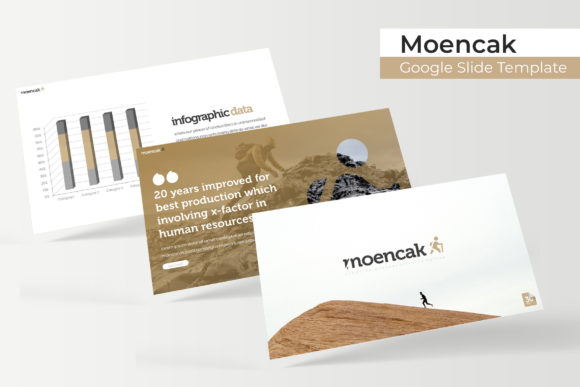
Moencak Google Slide Template: A Comprehensive Review
Creating a presentation that truly captivates an audience requires more than just bullet points and stock photos. It demands a cohesive visual language, a professional structure, and a design that feels intentional from the first slide to the last. For professionals and creatives who value efficiency without compromising on aesthetics, finding the right template can transform a daunting task into a seamless, even enjoyable, creative process. This is where a well-crafted resource like the Moencak Google Slide Template steps in, offering a robust foundation for anyone looking to communicate ideas with clarity and visual impact.
Beyond the Basics: What Makes This Template Stand Out
At its core, the Moencak Google Slide Template is a comprehensive design system for presentations. It’s not just a single file with a few layouts; it’s a curated collection of 150+ total slides, meticulously organized into five distinct premade color schemes. Each color variation contains 30 unique slides, providing immediate versatility for different projects, brand identities, or moods. Think of it as having five professionally designed presentations at your fingertips, ready to be adapted to your specific narrative.
The true value, however, lies in the thoughtful details that address common presentation pain points. The inclusion of handcrafted infographics is a significant advantage. Rather than struggling to create data visualizations from scratch, you have access to pre-designed charts, timelines, and process diagrams that are both beautiful and functional. This allows you to focus on your data and message, not on wrestling with graphic software. Similarly, dedicated section break slides and gallery/portfolio slides provide a polished way to transition between topics or showcase visual work, which is indispensable for designers, photographers, and agencies.
Practical Applications for Real-World Projects
The flexibility of this template system makes it suitable for a wide array of professional contexts. Its clean, modern typography and structured layouts are a perfect match for brand identity presentations. You can use it to walk a client through a new logo design, explain brand guidelines, or present a full brand strategy with a consistent and professional visual thread.
For marketing professionals and small business owners, the template is a powerhouse for creating compelling marketing assets. Use it to develop quarterly business reviews, pitch decks for investors, or training materials for your team. The pixel-perfect illustrations and editable graphics ensure that every slide aligns with your brand’s aesthetic, reinforcing visual consistency and aiding in brand recognition. Content creators and bloggers can leverage the gallery slides to create media kits or visual portfolios that effectively showcase their work to potential partners.
The design is also inherently practical for editorial layouts and digital product creation. If you’re designing an online course, an e-book, or a workshop, the structured slides provide a clear framework for presenting complex information in digestible chunks. The resizable and editable graphic picture placeholders are a game-changer here; simply drag and drop your own images into the designated areas, and the template handles the framing and composition, saving you hours of manual adjustment.
Mastering Your Workflow: Tips for Effective Use
To get the most out of the Moencak template, consider a few strategic approaches. First, choose the color variation that best aligns with your project’s emotional tone or your client’s brand palette. The five premade options give you a strong starting point, but the master slide functionality means you can further customize colors and fonts to achieve a perfect match.
Second, leverage the master slides. Every element in the template is built on this foundation, which means making a change to the master slide automatically updates all corresponding slides in your deck. This is essential for maintaining visual consistency when you need to adjust a font style, color, or logo placement across 150+ slides. It’s the professional’s method for efficient, error-proof editing.
Third, focus on readability. While the template uses a clean sans-serif font (with a free download link included), always ensure your text has sufficient contrast against the background and that font sizes are appropriate for your presentation context—whether it’s on a large screen or shared as a PDF. The included readme first file is a crucial resource; take a moment to review it for installation instructions and licensing details for the font used.
A Thoughtful Investment in Professional Communication
Ultimately, the Moencak Google Slide Template is more than just a collection of pretty slides. It’s a design asset that streamlines the creation of professional presentations, helping you communicate more effectively and with greater visual confidence. By providing a structured yet flexible framework, it empowers you to tell your story, present your data, and showcase your work in a way that engages your audience and reflects the quality of your ideas. Whether you’re closing a sale, educating a team, or sharing your creative vision, having a reliable and visually cohesive template in your toolkit is an investment that pays dividends in clarity and impact.