Atomizer Google Slide Template: Your All-in-One Presentation Kit
You know the feeling. You've got a brilliant idea, a game-changing business strategy, or a stunning portfolio to showcase, but the thought of building a presentation from scratch makes you want to close your laptop. The blank slide feels intimidating, and the default templates are, let's be honest, a little tired. You need something that looks polished, professional, and uniquely you, without spending a weekend fiddling with alignment and color schemes. This is where a comprehensive toolkit like the Atomizer Google Slide Template steps in, transforming presentation design from a chore into a seamless part of your creative workflow.
A Visual System, Not Just a Set of Slides
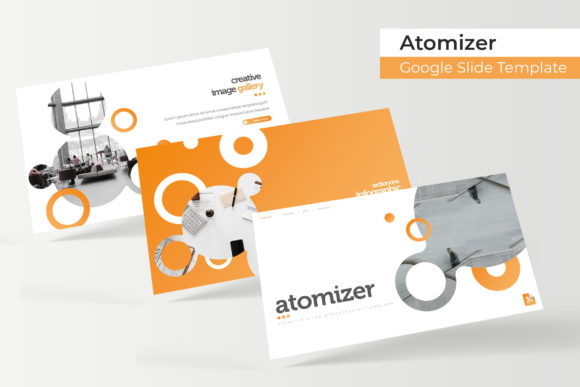
What makes the Atomizer template stand out is that it's built as a complete visual system. With 150+ total slides distributed across five premade color themes, you're not getting a single look—you're getting a versatile foundation. Each color variation contains 30 meticulously crafted slides, giving you a consistent yet adaptable palette to work with. This structure is incredibly practical for anyone managing multiple projects or brands. Imagine you're a marketing consultant pitching to three different clients in a week. With Atomizer, you can apply a cool blue theme for a tech startup, a warm terracotta set for a boutique lifestyle brand, and a sleek monochrome version for a corporate report, all while maintaining the same high-quality design backbone.
The real magic lies in the details designed for real-world use. Every graphic element is resizable and editable, built on master slides for pixel-perfect consistency. The drag-and-drop picture placeholder functionality is a game-changer for efficiency. Instead of meticulously cropping and resizing photos, you simply drag your image into the designated area, and it snaps perfectly into place. This feature alone can save hours of tedious work, especially when you're dealing with a gallery or portfolio slide that needs to showcase a dozen different product shots or design samples.
From Brand Identity to Marketing Collateral
Think about the touchpoints where your brand meets your audience. A cohesive presentation template like Atomizer becomes the connective tissue for your visual identity. The handcrafted infographics are perfect for breaking down complex data in investor pitches or quarterly reports, making information digestible and engaging. The dedicated section break slides provide clear visual pauses, helping to structure your narrative logically—ideal for educators, keynote speakers, or anyone guiding an audience through a multi-part story.
For entrepreneurs and small business owners, this template is a Swiss Army knife. Use it to create a stunning brand guidelines deck that you can share with freelance designers or social media managers, ensuring everyone uses your logos, colors, and fonts correctly. The portfolio slides are invaluable for photographers, interior designers, or agencies looking to present their work in a clean, compelling format. Beyond the screen, think about the assets you can derive. A beautifully designed slide can be exported as a high-resolution image for a social media graphic, a website banner, or even a print poster for an event. The visual consistency you establish in your presentation can seamlessly flow into your packaging design concepts, your blog headers, or your email marketing campaigns.
Practical Integration and Smart Workflow
Adopting a new design asset should simplify your process, not complicate it. The Atomizer kit comes with five PPTX files for both standard and widescreen formats, along with a clear "Readme First" file. This is crucial. It means you can start immediately without guessing how to install fonts or adjust layouts. The included font, which is free to download, ensures your typography looks exactly as intended from the first slide to the last. This attention to compatibility prevents the common headache of opening a file to find all your text replaced with a default font.
When integrating any new design asset, including a premium font or template, always test it within your specific context. Create a few sample slides using your brand's images and copy. Check the readability of the text against different background colors from the template. Try pairing the included font with a secondary typeface for body text if needed. Does the overall aesthetic align with the personality of your brand—is it modern, classic, playful, or authoritative? The five premade color variations give you a fantastic starting point, but don't be afraid to customize the color palette further to match your exact brand hex codes. This is how a template transitions from a generic tool to a genuine extension of your brand identity.
Maximizing Your Investment in Design Assets
A toolkit like Atomizer is an investment in efficiency and professionalism. To get the most out of it, think beyond the immediate presentation. Use the infographic elements to create standalone visual assets for your website or social media. Adapt the gallery layout to create a digital lookbook for your merchandise. The section break slides can be repurposed as striking quote graphics for Instagram or LinkedIn. By viewing the template as a library of modular design components rather than a fixed slide deck, you unlock its full potential to elevate every aspect of your visual communication.
Finally, a note on licensing and usage. The "Readme First" file will detail the terms, but generally, templates like this are licensed for commercial use. This means you can confidently use the designs you create for client work, for your business, or for products you sell. It’s a professional asset that grows with you, whether you're crafting your first investor deck, your tenth product launch presentation, or your hundredth client proposal. The goal is to spend less time wrestling with design tools and more time focusing on the message, story, and strategy that will truly connect with your audience.