Mail.me PowerPoint Template: A Visual Toolkit for Modern Brands
Staring at a blank slide deck can feel like staring at a blank page. You have the ideas, the strategy, and the data, but translating that into a cohesive, professional, and visually engaging presentation is a different challenge entirely. This is where a well-structured design asset becomes invaluable. The Mail.me PowerPoint Template isn't just a collection of slides; it's a comprehensive visual system designed to help you communicate with clarity and style. It provides the architectural framework so you can focus on your message, confident that the visual delivery will be polished and effective.
Beyond a Single Template: A Cohesive Design System
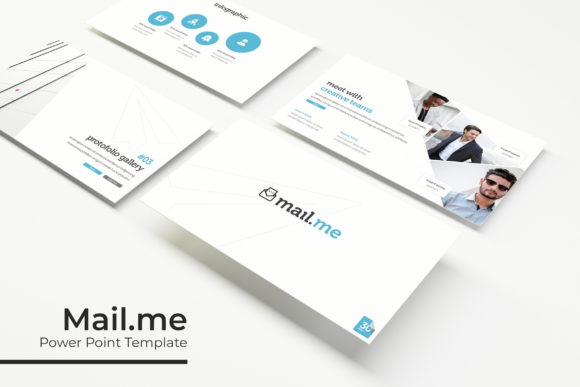
What immediately sets this resource apart is its scope. With 150+ total slides organized across five premade color schemes, it functions less like a single template and more like a mini design library. Each of the five color variations includes 30 meticulously crafted slides, offering a complete narrative arc for a presentation. This approach solves a common problem: maintaining visual consistency across multiple projects or for different brand facets. You can use one color scheme for internal team meetings, another for client-facing pitches, and a third for investor presentations, all while maintaining a unified aesthetic language rooted in the same core design.
The practical benefits are significant. For a small business owner or entrepreneur, this means you don't need to hire a designer for every new pitch deck or quarterly report. For a marketing team, it ensures that every piece of communication aligns with brand guidelines. The inclusion of handcrafted infographics is particularly noteworthy. Data visualization is often where presentations stumble, but having pre-built, editable charts and diagrams that are designed to work within the template's aesthetic saves hours of work and prevents the visual dissonance that comes from mixing generic PowerPoint charts with a custom design.
Practicality Meets Polish: Features for Real-World Use
A template's value is ultimately determined by how easily it integrates into your workflow. The Mail.me template is built on master slides, which is the industry standard for efficient PowerPoint design. This means you can make global changes—like updating a font or adjusting a color accent—in one place and have it reflect across all 150+ slides. This is a massive time-saver and a safeguard against inconsistent formatting.
The "pixel-perfect illustrations" and "resizable and editable graphic" placeholders speak to a level of care that matters when details are on the line. Whether you're preparing a slide for a large conference screen or a shared document, crisp graphics maintain professionalism. The drag-and-drop picture placeholder system is another thoughtful touch, allowing you to swap images quickly without manually cropping or repositioning every time. This is essential for anyone who works with a lot of product photography, team headshots, or portfolio images.
For those who build brands, the applications extend far beyond the conference room. The clean, modern typography and structured layouts are ideal for creating brand guidelines decks. The infographic slides can be repurposed for social media graphics or website diagrams. The portfolio and gallery slide layouts are perfect for creative professionals looking to showcase their work in a client proposal or a digital lookbook. Essentially, it's a design asset that supports visual consistency across your entire brand identity ecosystem.
Integrating Typography for Stronger Communication
While the template provides the structure, the typography you choose will give it voice. The package wisely includes a readme file with font information and free download links, ensuring you can perfectly replicate the preview's look. When selecting your final typeface, consider the personality you need to convey. A clean sans-serif font often works well for body text in presentations, offering excellent readability at a glance. For headlines, you might pair it with a display font or a subtle serif font to add a touch of sophistication or tradition.
The key is to test your font pairing within the actual slides. Does the headline font overwhelm the infographic? Is the body text legible against the background color? The template's structured layouts make this testing process straightforward. Remember, the goal is enhanced audience engagement. A harmonious pairing of a modern typeface with the template's clean lines can elevate a simple data slide into a compelling story, making your marketing assets more impactful.
A Foundation for Your Visual Storytelling
Ultimately, the Mail.me PowerPoint Template offers a robust foundation. It removes the friction of starting from scratch and provides a professional, adaptable canvas. It's a tool for the brand strategist mapping out a new identity, the content creator developing a course, the entrepreneur seeking funding, and the marketing professional rolling out a campaign. By combining a versatile design system with practical, user-friendly features, it allows you to direct your energy where it belongs: on crafting a clear, persuasive, and visually coherent message that resonates with your audience.