Mastering Visual Flow: The RE-ARRANGE PowerPoint Template
There is a specific kind of frustration that hits when you open a presentation software, ready to pitch a brilliant idea, only to be met with a blank white slide and a blinking cursor. You have the data, the strategy, and the vision, but translating that into a visual format that actually holds attention is a different beast entirely. It is not just about making things look pretty; it is about logical flow, branding cohesion, and respecting your audience's time. That is where the concept behind the RE-ARRANGE PowerPoint Template comes into play. It is not just a static file; it is a comprehensive design system built for professionals who need to move fast without sacrificing quality.
The Power of Modular Design
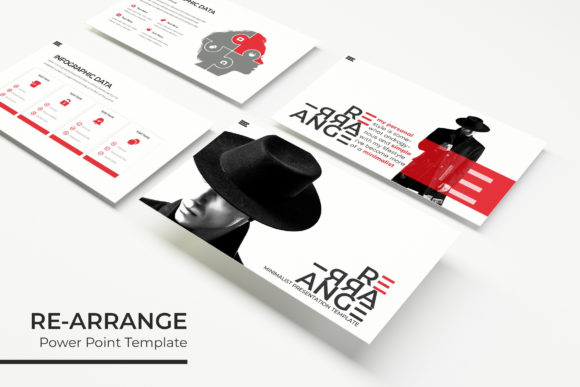
At its core, the RE-ARRANGE template is about modularity. With over 150 total slides included, this is less of a single presentation and more of a toolkit for visual communication. The real value here lies in the structure: you get five premade color schemes, with 30 distinct slides dedicated to each palette. This is a massive advantage for anyone managing multiple brands, clients, or product lines. Instead of settling for a generic template that does not quite match your brand guidelines, you have a ready-made ecosystem of variations.
For small business owners and entrepreneurs, this means you can maintain visual consistency across different departments or campaigns without hiring a designer for every single internal memo. The pixel-perfect illustrations ensure that whether you are projecting on a massive conference screen or sharing a PDF via email, the graphics remain crisp. This is the difference between looking amateur and looking polished. When a client sees sharp, vector-quality graphics, it subconsciously signals competence and attention to detail.
Visual Storytelling and Infographics
Data is useless if it cannot be understood. One of the standout features of this package is the inclusion of handcrafted infographics. We have all seen those cluttered charts with too many colors and unreadable labels. The infographics in the RE-ARRANGE system are designed to simplify complex information. Whether you are presenting quarterly financials, mapping out a user journey, or breaking down a supply chain process, visualizing that data helps with retention.
Furthermore, the inclusion of section break slides is a subtle but powerful tool for pacing. A presentation needs rhythm. If you drone on slide after slide with bullet points, your audience checks out. Section breaks act as mental palate cleansers, signaling a shift in topic and re-engaging the room. Combined with the gallery and portfolio slides, this template becomes an incredible asset for creative agencies and freelancers. Showing off your work requires high-quality placeholders that do not distort your images. The drag-and-drop functionality based on Master Slides makes swapping out your actual portfolio images effortless. You are not fighting the software to make the picture fit; the template does the heavy lifting for you.
Practical Applications Beyond the Boardroom
While this is a PowerPoint template, its utility extends far beyond the weekly team meeting. Think about the visual consistency required for a cohesive brand identity. If you are a course creator, you can use the master slide structure to design your lesson modules. The 16:9 widescreen format is standard for video content, meaning you could export these slides as graphics for YouTube thumbnails or even record your screen to create a video course.
For those in the marketing sphere, adaptability is key. You might need to create a media kit for a PR outreach one week and a pitch deck for investors the next. Having a system that allows you to rearrange elements—hence the name—means you are never starting from scratch. You are simply reorganizing building blocks. This is particularly useful for social media managers who often need to repurpose presentation content into carousels for LinkedIn or Instagram. The resizable and editable graphics ensure that you can pull an icon or a chart out of the presentation, resize it for an Instagram story, and it will still look sharp.
Workflow Efficiency and Ease of Use
One of the biggest hurdles with "premium" templates is often the learning curve. They look beautiful in the preview, but once you download them, you realize you need a degree in graphic design to change a font or move a box. The RE-ARRANGE template addresses this with its drag-and-drop architecture built on Master Slides. If you understand the basics of PowerPoint, you can use this. The Master Slide feature is the backbone of professional presentation design. It ensures that your fonts, colors, and positioning remain uniform across the entire deck, saving you from the tedious task of editing 100 slides individually when the CEO decides to change the brand color halfway through the project.
Additionally, the package comes with a "Readme First" file and links to the fonts used. This is a detail that separates a thoughtful design asset from a lazy one. Typography is half the battle in design. By providing the font download links, the template ensures that your end result looks exactly like the preview. You won't open the file to find that the text has defaulted to Calibri because you didn't have the original typeface installed. This attention to detail saves time and prevents frustration, allowing you to focus on the content rather than troubleshooting technical glitches.
Choosing Your Visual Direction
With five distinct color variations, the choice of which version to use depends entirely on the context of your message. Color psychology plays a massive role in how your audience perceives your information. A blue-heavy palette might be perfect for a corporate finance report or a tech startup pitch, conveying trust and stability. A vibrant, multi-colored variation might be better suited for a creative workshop or a lifestyle brand launch.
The ability to switch between these variations instantly is a game-changer for A/B testing your presentations. You could present the same data to two different focus groups using different color schemes to see which one resonates more. This level of flexibility is usually reserved for custom design work, but it is packaged right here. Whether you are preparing a startup pitch deck, a corporate training manual, or a visual portfolio, the RE-ARRANGE PowerPoint Template provides the structure and aesthetic quality needed to communicate your message effectively and professionally.