Mastering Visual Storytelling with The Summit Template
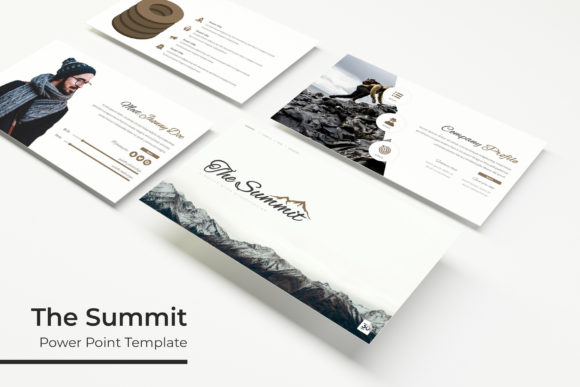
If you have ever sat staring at a blank presentation slide, cursor blinking mockingly back at you, you know the specific kind of anxiety that comes with starting from scratch. We often spend hours tweaking alignment and hunting for the right shade of blue, only to end up with a deck that looks... amateur. This is the exact problem The Summit Google Slide Template was built to solve. It is not just a collection of slides; it is a comprehensive design system intended to bridge the gap between a raw idea and a polished, professional visual narrative. Whether you are a startup founder pitching for funding, a marketer outlining a new campaign, or a freelancer delivering a project update, the structure of your presentation matters as much as the content. The Summit offers a robust framework—boasting 150+ total slides—that transforms the chaotic process of presentation design into a streamlined, drag-and-drop experience.
Beyond the Standard Deck: Understanding the "Summit" Aesthetic
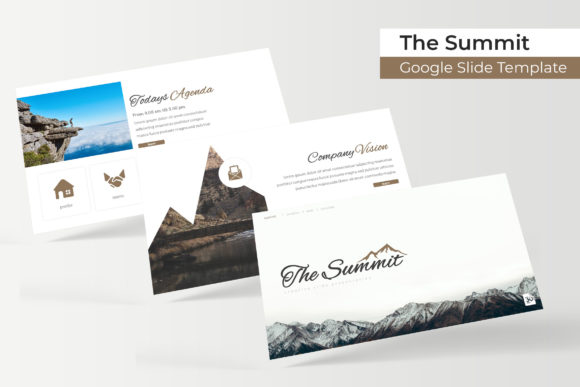
What makes a presentation truly engaging? It usually comes down to balance. A cluttered slide overwhelms the audience, while a slide with too little information feels like filler. The Summit Google Slide Template strikes a crucial equilibrium through its handcrafted infographics and pixel-perfect illustrations. These aren't the generic clip-art graphics you find in standard software; they are carefully designed visual assets meant to hold complex data without losing the viewer's attention.
The visual appeal lies in its versatility. With 5 premade color variations—each containing 30 distinct slides—you have immediate access to different moods and tones. One color palette might evoke corporate stability, while another screams creative energy. This variety is essential for brand identity. You can select the color scheme that aligns with your company’s hex codes, ensuring that your presentation feels like a natural extension of your website and marketing materials rather than an afterthought. The inclusion of section break slides is particularly useful for pacing. It allows the speaker to pause, let a key point sink in, and transition smoothly to the next topic, which is a hallmark of high-end editorial design.
Practical Workflow: The Power of Editable Graphics
For the busy professional, time is a currency. The technical architecture of The Summit Google Slide Template is designed to save you hours. Built upon Master Slides, the template ensures that global changes can be made instantly. If you decide halfway through your design process that your headers need to be a different font weight or your background needs a subtle texture, you don't have to edit 150 slides individually. You simply edit the Master Slide, and the changes cascade throughout the entire deck.
Furthermore, the resizable and editable graphic picture placeholders are a game-changer for visual consistency. We have all seen presentations where images are stretched, pixelated, or awkwardly cropped. This template uses smart placeholder technology that ensures your images maintain their aspect ratios while filling the designated space perfectly. This is vital for social media graphics and web design presentations where image quality is paramount. Whether you are showcasing a new product line, displaying packaging design mockups, or presenting a portfolio, the drag-and-drop functionality means you can focus on the visual story rather than wrestling with formatting tools.
Strategic Applications for Business and Creatives
A template is only as good as its application. The versatility of this specific set of design assets opens up a wide array of uses beyond a standard sales pitch. Consider the following scenarios where The Summit can elevate your output:
- Brand Strategy and Launches: Use the gallery slides to present mood boards for logo design or packaging. The structured layout helps clients visualize how their brand elements interact in the real world.
- Content Creation and Blogging: If you are a course creator or blogger, you can repurpose these slides into downloadable PDFs or digital products. The modern typography and clean layout make reading long-form text on screen much easier, improving readability and audience engagement.
- Marketing and Reporting: The infographics are perfect for data-heavy reports. Instead of pasting a raw Excel chart, use the handcrafted graphics to visualize KPIs. This makes dry data digestible and reinforces professional presentation standards.
- Event Planning: From corporate retreats to creative workshops, the template can be adapted to create invitations or event schedules that look premium and cohesive.
The goal is to use these slides to build visual consistency. When your internal team meeting decks look just as polished as your external client pitches, you build a culture of professionalism that boosts brand recognition and trust.
Typography and Pairing: The Details That Matter
One of the often-overlooked features of premium templates is the typography guidance. The package includes a "Readme First" file and a link to download the specific fonts used in the design. This is a critical detail for maintaining the integrity of the layout. Modern typography is about more than just choosing a pretty font; it is about hierarchy and spacing.
When working with this template, pay close attention to the font pairing suggestions provided. Typically, a display font or serif font is used for headers to grab attention, while a clean sans serif font is used for body text to ensure legibility at smaller sizes. If you decide to swap these out for your brand's specific typefaces, ensure you test the readability across different screen sizes. A script font or handwritten font might look beautiful in a title, but if it is used for bullet points, your audience will struggle to read it from the back of a conference room.
Think of the typography as the voice of your presentation. Just as you adjust your speaking tone for different audiences, you should adjust your typeface choices. The Summit provides a strong baseline, but understanding why those fonts were chosen helps you make informed decisions if you need to customize the deck further. Always prioritize clarity over style for the main body of your text to ensure your message lands effectively.
Maximizing Your Investment in Design Assets
Purchasing a premium font or template is an investment in efficiency. By utilizing the 5 PPTX Files (both standard and widescreen formats included), you are equipped for almost any venue or platform. The widescreen format is now the industry standard for most modern displays and projectors, but having the standard ratio ensures compatibility with older systems or specific print layouts.
To get the most out of this resource, treat it as a living library. Don't just use it once for a quarterly review and let it gather digital dust. Revisit the infographics when you need to explain a complex process. Use the portfolio slides to update your latest work for potential clients. Because the graphics are resizable and editable, they can be cropped out and used in other software—like Illustrator or Canva—for social media graphics or print materials.
Ultimately, a tool like The Summit Google Slide Template empowers you to communicate with clarity and confidence. It removes the technical barriers to good design, allowing you to focus on what you do best: sharing your ideas, building your brand, and connecting with your audience. Whether you are crafting a keynote speech or a simple internal memo, the visual foundation you use dictates how your message is received. With these assets at your disposal, you are well-equipped to make that message resonate.