Crafting Visual Masterpieces with The Summit Power Point Template
Imagine walking into a boardroom, a client pitch, or even a community workshop, and the moment your presentation appears on screen, the entire room's attention shifts. The slides aren't just informative; they're visually cohesive, polished, and designed with an intentional aesthetic that speaks volumes about your professionalism before you even utter a word. This isn't about flashy animations or overwhelming graphics. It's about clarity, consistency, and a design foundation that lets your content shine. For anyone who regularly communicates ideas—whether you're a startup founder pitching investors, a marketer outlining a campaign, or a teacher structuring a lesson—the tools you use directly impact how your message is received. A well-structured presentation template is more than a convenience; it's a strategic asset that bridges the gap between a good idea and a great delivery.
Beyond Basic Slides: A Toolkit for Cohesive Storytelling
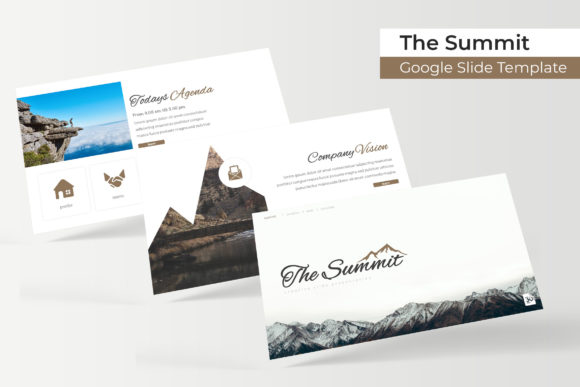
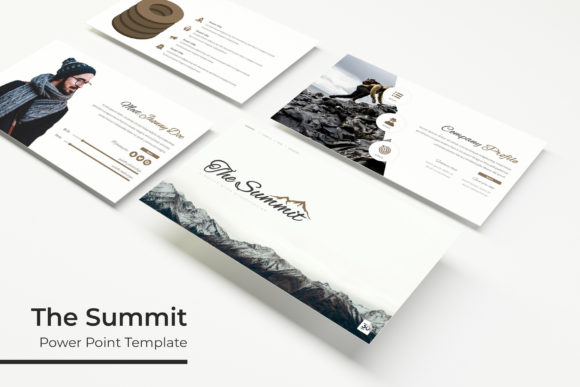
The Summit Power Point Template steps into this space not as a mere collection of slides, but as a comprehensive design system. Its core strength lies in its structure: 150+ total slides organized across five premade color palettes, with 30 meticulously crafted slides for each template variation. This isn't about having endless, overwhelming options. It's about having the right options at your fingertips. The five color schemes provide a ready-made starting point for aligning with existing brand guidelines or setting a specific mood—whether it's the clean professionalism of a corporate blue, the energetic vibe of a vibrant orange, or the sophisticated calm of muted earth tones. This pre-selection eliminates the guesswork and "color wheel paralysis" that often stalls the design process, allowing you to focus on your narrative.
What truly elevates this package are the handcrafted infographics and section break slides. We've all seen presentations where data is crammed into cluttered charts or where transitions between topics feel jarring. The infographics within The Summit are designed to transform complex data into digestible visual stories. A well-designed timeline, process flow, or comparison chart doesn't just display numbers; it guides the viewer's understanding. Similarly, the section break slides act as visual chapter markers, giving your audience a mental pause and reinforcing the structure of your argument. This attention to pacing is a subtle yet powerful way to enhance comprehension and retention.
Practical Applications: From Boardroom to Social Feed
The utility of a robust presentation template extends far beyond the traditional slide deck. Consider the Gallery and Portfolio slides included in the set. For a freelance graphic designer or photographer, these slides are instantly convertible into a sleek digital portfolio to share with potential clients. A small business owner could repurpose them to showcase product lines or customer testimonials in a visually engaging way during a webinar or sales call. The resizable and editable graphic picture placeholders, coupled with a drag-and-drop functionality based on master slides, mean that customizing these elements is intuitive. You're not wrestling with locked layers or obscure formatting; you're simply swapping in your content.
This adaptability makes The Summit a versatile component in a broader brand identity toolkit. The pixel-perfect illustrations and consistent visual language can inform more than just presentations. The color palettes can be extracted for social media graphics, ensuring your Instagram posts or LinkedIn banners feel harmonious with your slide decks. The clean, modern typography and layout principles can inspire the design of one-page sales sheets, event invitations, or even the hero section of a website. For content creators and marketers, this consistency is gold. It builds brand recognition. When your YouTube thumbnails, your email newsletter headers, and your investor pitch all share a common visual thread, you're building a professional and trustworthy brand image in the minds of your audience.
Maximizing Your Design Workflow
Getting the most out of a resource like this involves a few practical considerations. First, while the template provides a fantastic starting point, personalization is key. Use the master slides to your advantage. Adjusting the master slide for your title, content, and divider pages ensures that every single slide in your deck inherits your customizations, saving hours of manual tweaking. This is where true visual consistency is born.
Second, think about font pairing. The readme file included with the download specifies the fonts used, with free download links provided. This is a critical detail. Using the suggested fonts guarantees the design integrity you see in the preview. However, if you have established brand fonts, test them carefully. A general rule of thumb is to pair a clean, readable sans-serif for body text with a more distinctive serif or display font for headings. The Summit's design likely uses a harmonious pairing already, so if you deviate, ensure your chosen fonts maintain that balance of hierarchy and readability. Always view your final slides at a small scale—can you still read the key points? This simple test prevents embarrassing moments when your presentation is projected in a large room.
Finally, remember the licensing note: the photographs used in the preview are for illustration only. This is standard practice. It underscores the importance of using your own high-quality imagery or sourcing proper licensed photos. The template provides the structure and the design elements; you supply the authentic content that makes the presentation uniquely yours. By combining The Summit's robust framework with your own strategic content and imagery, you create a communication tool that is not only visually appealing but also genuinely effective at conveying your message and advancing your goals. It’s about having a professional foundation that empowers your voice, rather than overshadowing it.