Hadverb Google Slide Template: Professional Presentations Made Simple
Creating polished presentations shouldn't require a design degree or hours of wrestling with layouts. Whether you're pitching investors, teaching a workshop, or sharing quarterly results with your team, the visual quality of your slides directly impacts how your message lands. That's where a well-structured template collection like the Hadverb Google Slide Template steps in—not as a magic solution, but as a genuinely useful starting point that respects your time and elevates your visual communication.
What Exactly Is the Hadverb Google Slides Template?
At its core, Hadverb is a presentation template bundle designed for Google Slides and PowerPoint. It ships with over 150 total slides spread across five premade color variations—30 slides per color palette. Each variation is built on master slides, which means you edit one element and the changes cascade throughout the entire presentation. For anyone who's ever manually adjusted font sizes across 40 individual slides, you already understand why this matters.
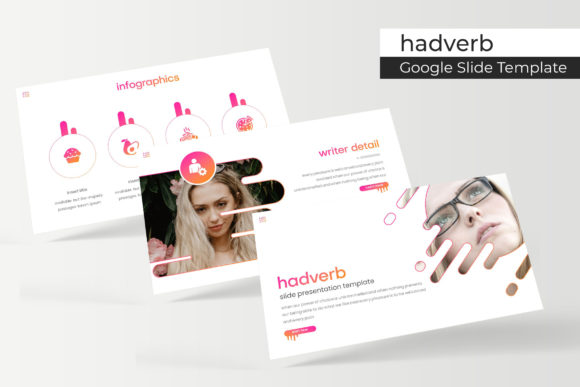
The collection includes handcrafted infographics, section break slides, gallery and portfolio layouts, and picture placeholders that support drag-and-drop functionality. You get five PPTX files in widescreen format, along with a readme file and links to download the free fonts used in the design. The pixel-perfect illustrations and resizable, editable graphics give you flexibility without requiring advanced design skills.
Why Color Variations Change Everything
One feature that deserves more attention than it typically gets is the five premade color schemes. Color psychology plays a massive role in how audiences perceive your content. A deep navy and gold palette communicates authority and trust—perfect for financial consulting presentations or corporate training decks. A softer pastel variation might suit a wellness brand's workshop materials or a creative agency's mood board presentation.
Having five distinct color palettes means you're not locked into a single aesthetic direction. You can match your brand identity without spending hours customizing hex codes. For small business owners managing multiple product lines or freelancers serving clients across different industries, this kind of built-in versatility is a practical time-saver rather than a flashy gimmick.
Real-World Applications Beyond the Boardroom
Presentation templates often get pigeonholed as corporate tools, but the Hadverb Google Slide Template works across a surprisingly wide range of creative and commercial projects. Consider these scenarios:
- Social media content creation: Export individual slides as images for Instagram carousels, LinkedIn posts, or Pinterest graphics. The widescreen format adapts well to landscape social content.
- Digital product development: If you sell online courses, workshops, or educational resources, a cohesive slide deck adds perceived value and professionalism to your offering.
- Portfolio presentations: Photographers, designers, and consultants can use the gallery and portfolio slides to showcase work samples in client meetings or on their websites.
- Marketing proposals: Agencies and freelancers presenting campaign strategies benefit from clean, structured layouts that guide the viewer's eye through data and creative concepts.
- Event planning and invitations: The infographics and section break slides adapt nicely to event timelines, program outlines, or even printed materials when exported at high resolution.
The template's structure also supports editorial layouts—think brand guidelines documents, style guides, or internal communication decks that need to look intentional rather than improvised.
Working With Master Slides and Drag-and-Drop Placeholders
For those unfamiliar with master slide functionality, here's the practical benefit: master slides act as templates within your template. When you modify the master slide—adjusting fonts, colors, or layout positions—every slide built on that master updates automatically. This ensures visual consistency across your entire presentation without requiring you to check each slide individually.
The drag-and-drop picture placeholders are equally straightforward. Instead of resizing and cropping images manually, you simply drop your photograph or graphic into the designated area, and the template handles the framing. This works particularly well for portfolio presentations where you're swapping out project images frequently, or for marketing decks where team photos and product shots need to look uniform.
Both features reduce the friction between having a template and actually using it effectively. Many people download design assets with good intentions, only to abandon them because customization feels overwhelming. The Hadverb template's structure minimizes that barrier.
Typography Considerations for Your Presentations
The template includes links to free fonts, which is a detail worth noting. Font licensing can trip up even experienced designers—using a typeface in a commercial presentation without proper licensing creates unnecessary risk. By bundling free, commercially usable fonts, the Hadverb collection removes that concern from the equation.
When customizing your slides, keep readability front and center. Presentation fonts need to work at a distance, which means overly ornate script fonts or ultra-thin sans serifs often struggle in slide format. The fonts included in this template were chosen with screen display in mind, but if you decide to swap them out, test your replacements at actual viewing size. A font that looks elegant at 12 points on your laptop might become illegible when projected on a conference room screen.
Font pairing also matters. If you're introducing a secondary typeface for emphasis or hierarchy, aim for contrast without conflict. A clean sans serif headline paired with a readable serif body text creates natural visual rhythm. Avoid pairing two fonts that are too similar in weight or style—they'll compete rather than complement.
Getting the Most From Your Template Investment
Downloading a template is the easy part. Making it genuinely useful requires a few minutes of intentional setup. Here's a practical approach:
- Choose your color variation first. Before adding any content, select the palette that best aligns with your brand or project goals. Switching colors later is possible but requires more rework.
- Customize the master slides early. Adjust your logo placement, default fonts, and any recurring elements before building out individual slides. This prevents repetitive edits later.
- Use the infographics intentionally. The handcrafted infographics work best when they support a specific data point or concept. Don't include them purely for decoration—every visual element should earn its place.
- Test your final deck in presentation mode. Animations, transitions, and text sizing can behave differently when you're editing versus presenting. Always do a full run-through before sharing.
One final note worth mentioning: the preview images showing lifestyle photographs and product shots are for illustration purposes only and aren't included in the download. You'll need to supply your own imagery, which actually works in your favor—authentic, on-brand photography will always resonate more with your audience than generic stock visuals.
Whether you're building a pitch deck for a new business idea, assembling a visual report for stakeholders, or creating educational content for your community, starting with a thoughtfully designed template gives you structure without sacrificing creative control. The Hadverb Google Slide Template offers that balance in a format that's accessible to both seasoned designers and anyone who simply needs their presentations to look sharp and professional.