Designing Dynamic Decks with Kinara: A Visual Deep Dive
Every entrepreneur and creative professional has been there: staring at a blank slide, trying to pull together a cohesive narrative that not only shares data but also captivates an audience. We spend hours tweaking alignment, sourcing icons, and trying to match hex codes, only to end up with a presentation that feels disjointed. In the fast-paced world of visual communication, time is a resource we cannot afford to waste on low-value design tasks. This is where the shift from generic tools to specialized design assets becomes a game-changer, specifically when looking at comprehensive solutions like the Kinara Keynote Template.
Beyond Basic Slides: The Architecture of 150+ Visual Stories
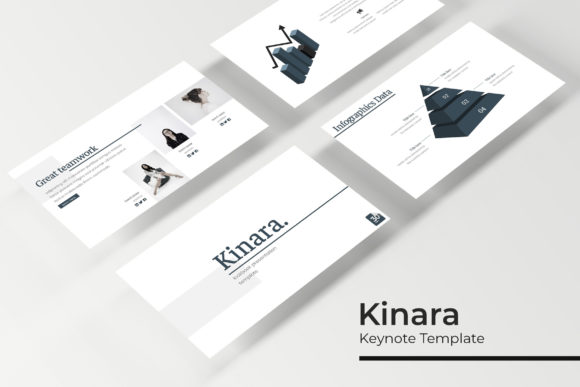
What sets a professional pitch deck apart from an amateur one is the architecture of the slides. The Kinara Keynote Template is not just a collection of backgrounds; it is a robust ecosystem of 150+ total slides. For a business owner or marketer, this volume is critical. It means you have the flexibility to pivot your narrative based on your specific audience. Whether you are a small business owner pitching to investors or a marketing professional outlining a quarterly strategy, having a deep library of layouts prevents you from reusing the same tired formats.
The true strength of this collection lies in its structure. With 5 premade colors, the template offers distinct visual identities right out of the box. You aren't just getting five copies of the same file; you are getting 30 slides for each template variation. This modular approach allows you to mix and match, creating a deck that feels entirely custom. The inclusion of section break slides is a subtle but powerful feature. These allow you to pause the narrative, reset the audience’s attention, and clearly delineate between different topics—be it moving from "Market Analysis" to "Product Features" or from "Case Studies" to "Financials."
Visualizing Data with Handcrafted Infographics
Raw data is boring. A spreadsheet pasted onto a slide kills the energy in a room. The Kinara Keynote Template solves this through handcrafted infographics. As a designer, I know that data visualization requires a delicate balance between accuracy and aesthetics. These infographics are designed to simplify complex information, making it digestible for your audience.
Imagine presenting a roadmap for a new digital product. Instead of a bulleted list of dates, you can utilize the custom flowcharts and timeline graphics included in the package. For those in editorial design or packaging design, these infographic elements can be repurposed to explain processes or ingredient lists. The pixel-perfect illustrations ensure that even when projected on a large screen, your visuals remain crisp and professional. This level of detail helps build trust; when your visuals look expensive and well-thought-out, your audience subconsciously attributes that same quality to your business idea.
Workflow Efficiency: Master Slides and Drag & Drop
One of the biggest pain points for entrepreneurs and content creators is the technical barrier of software. Keynote is powerful, but manual formatting is tedious. The Kinara Keynote Template is built upon Master Slides. This means the heavy lifting of formatting is already done. If you want to change a global font or adjust the color scheme of the entire deck, you do it once in the master view, and it cascades through the entire presentation.
Furthermore, the resizable and editable graphics are a lifesaver. We have all experienced the frustration of trying to insert a photo into a placeholder, only to have it stretch awkwardly or crop out the subject's head. The picture placeholder functionality here is intuitive—it allows for true drag & drop efficiency. This is particularly useful for social media graphics and blog feature presentations where high-quality imagery is essential to the storytelling. You can swap out stock photos for your own branded photography in seconds, ensuring the deck feels like an extension of your brand identity.
Color Psychology and Brand Consistency
Color is not just decoration; it is a psychological trigger. The 5 color variation included in the Kinara Keynote Template are likely curated to cover different moods and industries. You might find a palette that suits a corporate finance report, another that fits a vibrant creative startup, and perhaps a muted, earthy tone perfect for eco-friendly or wellness brands.
For those managing brand recognition, consistency is key. Using the same color story across your web design, print materials, and presentation decks creates a unified experience. If you are a brand strategist, you can use these variations to propose different directions to a client. The ability to switch between a modern typography look and a more traditional layout within the same file structure allows for A/B testing of visual concepts before finalizing a brand identity.
Adapting Kinara for Diverse Creative Projects
While this is a Keynote template, its utility extends far beyond the conference room. Think of the slides as individual design canvases. A small business owner could export individual slides as high-resolution images to use for Instagram carousels or Facebook ads. The clean layouts are perfect for merchandise mockups or invitation designs.
Consider the gallery and portfolio slides. For photographers, interior designers, or crafters, these layouts provide a structured way to showcase work without the grid feeling cluttered. You can create a "Lookbook" presentation to send to potential stockists or clients. Because the graphics are editable, you can resize the frames to fit vertical images or panoramic shots, adapting the tool to your specific content needs rather than forcing your content to fit the tool.
Practical Considerations: Fonts and Compatibility
A beautiful design falls apart if the typography breaks. The Kinara Keynote Template package includes a Readme First file and font download links. This is a crucial step often overlooked by beginners. When you open the PPTX files, Keynote will try to map the fonts to what you have installed. To maintain the intended aesthetic, you must install the specified free fonts first.
The choice of font style—whether it is a bold sans serif for headers or a clean serif for body text—dictates the readability of your message. Good typography ensures that your audience isn't squinting to read the fine print on your packaging design mockups or your marketing assets. Always review the included font styles to ensure they align with the voice of your project. A playful script font might work for a bakery's logo design concept, but it would be inappropriate for a serious financial report.
Finalizing Your Workflow
When you download the Kinara Keynote Template, you are receiving 5 PPTX Files and 5 PPTX Widescreen formats. This dual availability ensures that whether you are presenting on a standard laptop screen or a widescreen projector, the resolution and aspect ratio will be perfect. There is no need to manually adjust margins or worry about black bars appearing on the sides of your presentation.
One final note on usage: while the template provides the structure, the content is yours. The preview images you might see online often use placeholder photography; remember that all photographs or pictures used in the preview are not included. They are there for illustration purpose only. This is standard practice in the design assets world, so plan to have your own high-quality imagery ready to drop in. By combining the professional structure of the Kinara Keynote Template with your unique brand assets, you create a presentation that doesn't just share information—it tells a compelling visual story that drives engagement and action.