Serenade Keynote Template: Crafting Polished Presentations
Imagine this: you’ve spent weeks perfecting your business plan, your design portfolio, or your marketing strategy. You know the content inside and out, but when it’s time to present it, you open a blank slide deck and freeze. The pressure to make it look professional, cohesive, and visually engaging can be paralyzing. This is where having the right design asset, like a thoughtfully constructed presentation template, transforms from a nice-to-have into a genuine necessity. It’s not about taking shortcuts; it’s about starting with a strong foundation so your brilliant ideas get the stage they deserve.
More Than Just Slides: A System for Visual Storytelling
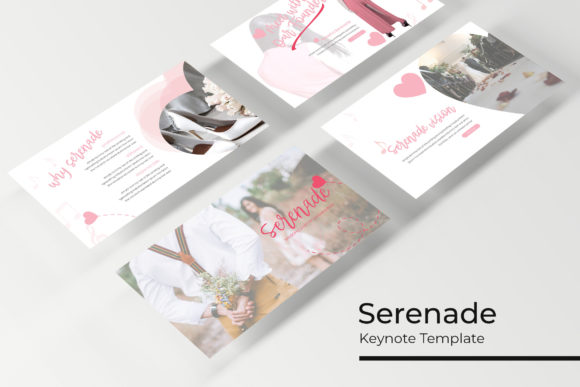
The Serenade Keynote Template isn't just a collection of pretty slides. Think of it as a complete visual communication system. With over 150 total slides organized across five distinct, premade color palettes, it offers a level of versatility that’s rare. Each color variation provides 30 unique slides, meaning you’re not just changing a background hue—you’re accessing a fully realized aesthetic for a specific mood or brand identity. Whether you need the crisp professionalism of a navy and gold scheme or the energetic vibe of a coral and teal combination, the groundwork is already laid. This approach saves countless hours that would otherwise be spent tweaking colors, alignment, and consistency across dozens of individual slides.
The real value for a designer, entrepreneur, or marketer lies in the system’s architecture. Built upon Master Slides, every element is interconnected. Change the primary color in one place, and it cascades through your entire presentation, ensuring absolute visual consistency. This is critical for brand recognition. Your audience, whether they’re investors, clients, or social media followers, should experience the same visual language from your website to your pitch deck. The template’s pixel-perfect illustrations and handcrafted infographics are designed to work within this system, providing professional-grade data visualization and decorative elements that elevate your narrative without overwhelming it.
Practical Applications for Real-World Projects
So, how does this translate to your day-to-day work? Let’s break it down by the kinds of projects you’re likely tackling.
For Branding and Client Pitches: A small business owner can use the portfolio and gallery slides to showcase products, team members, or past work in a clean, compelling grid. The section break slides act as perfect chapter dividers, giving your presentation a natural rhythm and making complex information digestible. Instead of a chaotic wall of text and images, you guide your audience through a structured story.
For Marketing and Social Media Content: Content creators and social media managers will find the resizable and editable graphics particularly useful. Need an infographic for an Instagram post or a LinkedIn article? Pull a slide from the Serenade template, customize the data and colors to match your campaign, and export it as an image. The drag-and-drop picture placeholders make swapping out product shots or lifestyle images incredibly efficient, which is a lifesaver when you’re working with tight deadlines.
For Internal Training and Reports: Even in a corporate environment, clarity is king. Use the infographic slides to break down quarterly results, explain a new process, or visualize market research. The professional design lends credibility to your internal communications, helping to engage your team and make information stick. The included PPTX Widescreen files ensure your presentation looks sharp on modern displays, from boardroom projectors to laptop screens.
Key Features That Save Time and Reduce Stress
Several technical details make this template particularly user-friendly, especially if you’re not a PowerPoint or Keynote power user.
Master Slides as Your Safety Net: This is the backbone of the template. By editing the Master Slides, you can globally control fonts, color schemes, and recurring design elements. This prevents the common nightmare of having one slide with a slightly different font size or misaligned logo, which can undermine a professional presentation. It enforces consistency effortlessly.
True Editability and Flexibility: The graphics aren’t just static images. Because they’re built with editable shapes and vectors, you can resize them without losing quality, change their colors, and even adjust their forms. This means an infographic designed for a business context can be repurposed for a creative workshop by simply altering its color scheme and icons. The picture placeholders are equally flexible; you can drag your own images into them, and they will automatically crop and fit to the designated shape, saving you from tedious manual adjustments.
What’s Actually in the Box: When you download, you get 5 PPTX files (standard) and 5 PPTX Widescreen files, each for the five color variations. The included Readme First file is crucial—it provides the link to download the free font used in the template. Using the specified font ensures your presentation looks exactly like the preview, maintaining the intended design harmony. Remember, the photographs shown in demos are for illustration only; you’ll need to use your own licensed images.
Making It Your Own: Tips for Customization
A template is a starting point, not an endpoint. Here’s how to adapt it to your specific needs.
Aligning with Your Brand Identity: Start by selecting the color variation that comes closest to your brand’s primary palette. Then, use the Master Slides to fine-tune it. Input your exact brand hex codes for the key color swatches. Swap the placeholder logo for your own. These initial steps will instantly make the template feel uniquely yours.
Choosing the Right Content for Each Slide: Don’t force your content into a slide that doesn’t fit. Browse the entire library of 150+ slides. You might find a timeline slide works better for your project history than a simple bulleted list. The variety of layouts is there to help you present information in the most effective way possible, not just to look nice.
Typography Considerations: The template uses a specific, free font for a reason—it pairs well with the design. However, if you must use your brand’s proprietary typeface, be mindful of hierarchy and readability. Use the bold or italic versions provided in the font family for emphasis. Ensure body text remains at a legible size, especially for slides that will be projected. The goal is a seamless blend of the template’s professional structure with your brand’s unique voice.
Ultimately, a tool like the Serenade Keynote Template is about reducing friction in the creative process. It handles the heavy lifting of layout, consistency, and aesthetic cohesion, freeing you up to focus on what truly matters: your message, your story, and your connection with the audience. It’s a practical investment for anyone who regularly needs to communicate ideas visually and professionally, turning the daunting task of deck-building into a streamlined, even enjoyable, part of your workflow.