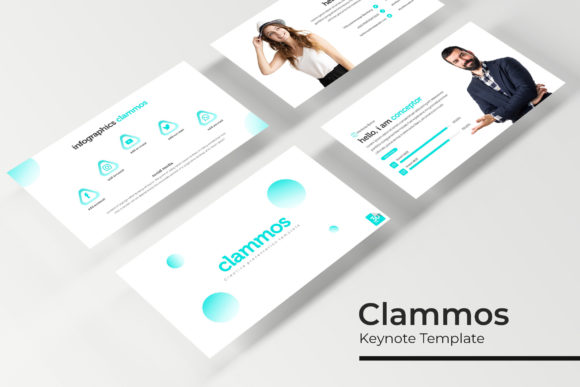
Clammos Keynote Template: A Flexible Suite for Polished Presentations
Ever sat down to build a presentation, only to realize the default slides feel lifeless? Or worse, you've found a template you love, but it's locked into a single color scheme that clashes with your brand? The Clammos Keynote Template solves these common frustrations by offering a comprehensive, adaptable toolkit designed for professionals who value both aesthetics and efficiency. It's not just a set of slides; it's a system built to help you tell your story with clarity and visual confidence.
A Foundation Built on Choice and Consistency
The core strength of this package lies in its thoughtful structure. With 150+ total slides, you're not getting a monolithic file to sift through. Instead, you receive 5 premade color themes, each containing 30 meticulously crafted slides. This approach is brilliant for anyone managing multiple projects, clients, or brand identities. A marketing agency could use the deep blue theme for a corporate client, switch to the vibrant coral for a lifestyle brand, and utilize the sleek monochrome for a tech startup—all from the same foundational template. This built-in versatility ensures your presentations can adapt to any context without sacrificing a cohesive, professional look.
Every slide is designed with pixel-perfect illustrations and handcrafted infographics. This means the charts, icons, and diagrams aren't generic clip art. They are custom graphics that feel integrated and intentional, helping to visualize data in a way that is both engaging and easy to understand. For a small business owner pitching to investors or a content creator explaining a process, these infographics can turn complex information into a compelling visual narrative.
Practical Features for Real-World Design Work
Beyond the visual assets, the Clammos Keynote Template is engineered for practical use. The slides are fully resizable and editable, allowing you to adjust layouts to fit your specific content. The use of picture placeholders with drag & drop functionality streamlines the process of adding your own images. You don't need to be a design expert to make a slide look polished; you simply drag your photo into the designated area, and the template handles the framing and positioning.
The entire system is based on master slides. This is a crucial feature for maintaining brand consistency. Edit the master slide once—perhaps to change the primary font or adjust the logo placement—and the change automatically propagates across all 30 slides in that color theme. This saves an immense amount of time and prevents the small, inconsistent errors that can creep in when manually editing dozens of individual slides.
For moments when you need to shift gears in your presentation, the included section break slides provide a clean, visual pause. The gallery and portfolio slides offer dedicated layouts for showcasing work, whether you're a designer displaying recent projects, a photographer highlighting a series, or a business presenting case studies. These purpose-built slides remove the guesswork from layout design.
Integrating a Cohesive Visual Language
A presentation is often the first major touchpoint in a pitch or meeting. Using a tool like the Clammos Keynote Template helps bridge the gap between your other brand materials and your spoken content. The same design principles that guide your logo design, packaging, and social media graphics can be reflected in your slides. This creates a seamless experience for your audience, reinforcing brand recognition and visual consistency.
Consider how this applies across different projects:
- For Marketing Assets: Use the template to create cohesive pitch decks, webinar visuals, or internal reports that align with your campaign collateral.
- For Digital Products: Develop workshop slides, online course modules, or webinar presentations that look as professional as the product itself.
- For Editorial Layouts: The clean, structured slides can inspire the layout of digital magazines, lookbooks, or investor updates.
- For Invitations and Posters: While primarily for presentations, the high-quality graphics and typography can be adapted for single-page designs like event invitations or promotional posters.
The included free font download link is a thoughtful addition, ensuring that the typography you see in the preview is exactly what you get. This eliminates the last-minute scramble to find and install matching fonts, which is a common headache with other template packs.
Getting Started and Making It Your Own
When you download the package, you'll find 5 PPTX files (standard) and 5 PPTX Widescreen files, giving you the correct format for any display or projector. The Readme First document is essential reading—it likely contains specific instructions on how to install the font and any tips for customizing the master slides.
My advice for working with a comprehensive template like this is to start with your content, not the slides. Outline your key points first. Then, choose the color theme that best fits the mood and brand of your presentation. Begin by editing the master slides to set your global fonts and logo. From there, populate your content into the pre-designed layouts. The structure is there to guide you, not to constrain you. Feel free to combine slides from different sections, duplicate layouts for repeated points, and, most importantly, replace the placeholder images with your own high-quality photographs to make the presentation uniquely yours.
In a world where attention spans are short, a well-designed, visually coherent presentation is no longer a luxury—it's a necessity. A resource like the Clammos Keynote Template provides the professional scaffolding so you can focus on what matters most: your message, your story, and connecting with your audience.