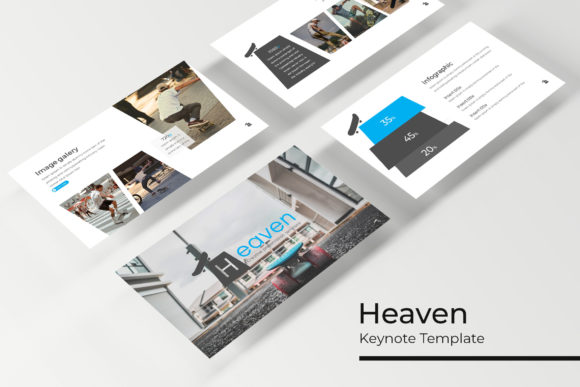
Heaven Keynote Template: Crafting Presentations That Resonate
You know that feeling when you open a blank slide deck and the cursor just blinks back at you? For designers, entrepreneurs, and content creators, the initial setup phase is often the most daunting part of creating a presentation. We spend hours aligning text boxes, choosing color palettes, and resizing images that should have taken minutes, not the entire afternoon. The goal isn't just to share information; it's to maintain the same level of visual integrity in your slide deck that you have on your website or in your branding kit. This is where the structure of a comprehensive tool like the Heaven Keynote Template comes into play, transforming the blank canvas into a playground of organized potential.
When we talk about modern typography and layout in the context of presentations, we aren't just talking about picking a "nice font." We are talking about visual communication strategy. A premium template system acts as a safeguard for your brand identity, ensuring that every time you pitch a client, onboard a new hire, or present a webinar, you are reinforcing who you are as a brand. With over 150 total slides, this particular asset isn't just a collection of pages; it’s a comprehensive design ecosystem built for versatility.
The Architecture of Visual Consistency
One of the biggest struggles for small business owners and marketers is maintaining consistency across different platforms. You might have a stunning logo and a beautiful website, but if your internal presentations or client pitches look disjointed, it creates a subtle friction in how your audience perceives your professionalism. The Heaven Keynote Template solves this by providing a robust foundation built on master slides. This is a technical feature that has massive practical benefits: it means you can change a font style or color palette once at the root level, and it ripples through the entire deck instantly.
For those of us who aren't full-time graphic designers, the inclusion of 5 premade color variations is a lifesaver. Instead of guessing which hex codes work well together, you have professionally curated palettes ready to go. Whether you are working on a sleek corporate pitch or a vibrant social media strategy presentation, having 30 distinct slides tailored for each color variation allows you to match the mood of your specific project without compromising on design quality. It takes the guesswork out of color theory and allows you to focus on the content itself.
Furthermore, the layout structure addresses one of the most common pitfalls in presentation design: clutter. We’ve all seen slides where the text is too small, the images are stretched, or the graphics are pixelated. The "Pixel-perfect illustrations" included in this package ensure that your visuals remain sharp and professional, regardless of the screen size you are projecting onto. This attention to detail is what separates amateur efforts from professional visual communication.
Practical Applications Beyond the Boardroom
While we often associate Keynote or PowerPoint files with corporate meetings, the utility of a high-quality template extends far beyond quarterly reviews. Think about the content creators and digital marketers among us. You can repurpose these slides into dynamic social media graphics. By exporting individual slides as high-resolution images, you can create consistent Instagram carousels, Pinterest pins, or Facebook ad visuals that align perfectly with your brand guidelines.
For the entrepreneurs and small business owners, consider the power of the "Gallery and Portfolio slide" feature. If you are a photographer, interior designer, or crafter, you can utilize the picture placeholders to create a digital lookbook. The drag-and-drop functionality makes this incredibly efficient. You don't need to wrestle with cropping tools; simply drop your image into the placeholder, and the template handles the framing. This allows you to create a polished portfolio PDF for potential clients in minutes rather than hours.
The versatility also extends to educational and editorial layouts. If you are launching a digital product or an online course, the section break slides are essential for chunking information into digestible modules. Good design aids in readability and retention. By using distinct section breaks, you signal to the viewer that a new topic is beginning, helping to keep them engaged and reducing cognitive load. It’s a subtle psychological trick that improves audience engagement significantly.
Optimizing Workflow and Editability
Time is the most valuable currency for anyone running a business or managing a brand. The design of the Heaven Keynote Template acknowledges this by prioritizing an intuitive workflow. The "Resizable and Editable Graphic" features are particularly vital here. In the fast-paced world of marketing assets and branding, you often need to adapt your materials on the fly. Perhaps a last-minute sponsor needs their logo included, or you need to adjust a chart to reflect new data.
Because the template is based on master slides, making these global changes is non-destructive. You aren't breaking the layout every time you move a text box. This structural integrity is crucial for maintaining that "pixel-perfect" look even after heavy editing. It empowers you to be the designer without needing a degree in graphic design, bridging the gap between a creative vision and a technical execution.
Additionally, the inclusion of handcrafted infographics cannot be overstated. In an era of data-driven marketing, simply listing numbers isn't enough. Visualizing data through charts, graphs, and timelines helps tell a story. Whether you are presenting market research to stakeholders or explaining a workflow to your team, these editable infographics allow you to translate complex data into easy-to-understand visual narratives. This capability is a massive asset for anyone involved in editorial design or business strategy.
Integrating the Template into Your Brand Ecosystem
When you download a comprehensive package like this—comprising 5 PPTX files and widescreen formats—you are essentially acquiring a design system. However, the real value comes from how you integrate it into your existing brand identity. My advice to anyone using a premium font or template is to start by auditing your current assets. Look at your logo, your website typography, and your primary brand colors.
The goal isn't to use the template exactly as it comes out of the box, but to use it as a scaffold for your own identity. If the template uses a sans-serif font but your brand is built on a traditional serif typeface, swap them out. The master slide structure allows for this easily. The template provides the hierarchy and the rhythm; you provide the personality.
Consider the practicalities of file management as well. With 5 distinct color variations included, it is tempting to mix and match. I recommend selecting the variation that best resonates with your primary brand color and saving that as your "Master Brand Deck." This ensures that every time you need to create a new presentation—whether for a sales pitch, a workshop, or an internal strategy session—you have a consistent starting point. This kind of preparation is what allows for agility in business.
Final Thoughts on Presentation Design
Ultimately, a presentation is a tool for persuasion and clarity. Whether you are a freelancer pitching for a new contract, a teacher explaining a complex subject, or a marketer launching a new campaign, the visual medium through which you speak matters just as much as the words you use. The Heaven Keynote Template offers a sophisticated framework that balances aesthetic appeal with functional utility. It removes the barriers to professional design, allowing you to focus on what you do best: communicating your ideas. By leveraging these pre-built assets and customizing them to fit your unique voice, you ensure that your message is not only heard but seen in the best possible light.