Serenade: A Complete Presentation Toolkit for Visual Storytelling
Every professional has sat through a presentation that felt like a chore—slides cluttered with bullet points, inconsistent colors, and generic layouts that fail to hold attention. Whether you're pitching to investors, teaching a workshop, or showcasing a portfolio, the design of your slides speaks volumes before you even say a word. A polished, cohesive presentation builds trust and keeps your audience engaged, while a messy one can undermine even the strongest ideas.
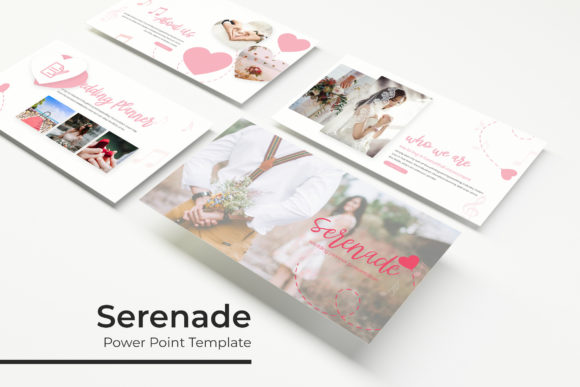
That's where a thoughtfully designed template system like the Serenade PowerPoint Template comes in. It's not just a single set of slides—it's a versatile toolkit built around five premade color themes, each containing 30 unique slides, totaling over 150 ready-to-use layouts. This structure gives you the flexibility to match any brand identity, mood, or topic without starting from scratch every time.
Why a Multi-Theme Template System Changes the Game
Most presentation templates offer one color scheme and a handful of slide types. You end up spending more time customizing than actually building your message. Serenade takes a different approach. With five distinct color palettes pre-built into the system, you can quickly adapt to different clients, campaigns, or audiences. A deep navy theme might work perfectly for a corporate financial report, while a warm terracotta palette could set the tone for a lifestyle brand pitch.
Each of the 30 slides per theme includes a variety of layouts: section breaks, gallery and portfolio slides, data visualization pages, quote slides, and content-heavy templates with picture placeholders. The drag-and-drop image placeholders are particularly useful—you can drop in your own photographs or illustrations without fiddling with cropping or alignment. Everything is built on master slides, so changes to fonts, colors, or layouts propagate across the entire deck instantly.
Practical Applications Across Industries
Think about how many contexts call for a strong visual presentation. A freelance designer might use the portfolio slides to showcase recent branding projects during client calls. A small business owner preparing for a local chamber of commerce event could use the infographic slides to break down quarterly growth metrics in a way that's easy to digest. A content creator launching an online course might rely on the section break slides to organize modules clearly.
Marketing teams benefit enormously from this kind of flexibility. Imagine preparing a social media strategy presentation for three different clients in the same week. Instead of rebuilding each deck from the ground up, you select a color theme that aligns with each client's brand, swap in their logos and images, and populate the content. The pixel-perfect illustrations included in the template add a layer of polish that stock graphics often can't match—they feel intentional and cohesive rather than generic.
Educators and trainers also find value in a system like this. Workshop facilitators can create visually consistent materials across multiple sessions, reinforcing their personal brand while keeping participants focused. The resizable and editable graphics mean you can adjust visual elements to emphasize key points without losing quality, even when projecting on large screens.
Building Visual Consistency Without the Overwhelm
One of the biggest challenges in professional communication is maintaining a consistent visual identity. When your presentation materials, social media graphics, website, and print collateral all look like they came from different brands, it creates confusion and erodes trust. A unified template system helps solve this by providing a structured framework that enforces consistency naturally.
The five premade colors in Serenade aren't random—they're carefully curated to work harmoniously across different design contexts. Each palette includes complementary tones that function well for backgrounds, accent elements, text, and data visualization. This eliminates the guesswork that often leads to clashing combinations or washed-out contrasts. You're working within a system designed for visual coherence, which is especially valuable if you don't have a dedicated designer on your team.
The handcrafted infographics deserve special mention. Data presentation is one of the most common pain points in slide design. Bar charts and pie graphs generated by default PowerPoint tools often look dated or overly simplistic. Custom infographics, on the other hand, can transform raw numbers into compelling visual stories. When those infographics are already integrated into your template system, you save hours of manual design work while still delivering professional results.
What's Actually Included and How to Get Started
The Serenade package includes five PPTX files in widescreen format, one for each color theme. You also get a readme file with setup instructions and links to download the free fonts used in the template. This is a practical detail that many template sellers overlook—there's nothing more frustrating than opening a file and seeing missing font warnings. Including the font links upfront means you can get your presentation looking exactly like the preview without hunting down typefaces.
A quick note about the preview images: the photographs and pictures shown in the template demos are for illustration purposes only and aren't included in the download. This is standard practice, but it's worth mentioning so you can plan accordingly. Having a library of your own high-quality images—or access to a stock photo service—will help you make the most of the picture placeholder slides.
Getting started is straightforward. Open the PPTX file that matches your desired color theme, navigate to the slide sorter view to get a bird's-eye perspective of all 30 layouts, and begin selecting the slides that fit your content structure. Because everything is based on master slides, you can modify fonts, adjust color accents, or rearrange elements without breaking the overall design integrity. The drag-and-drop placeholders make inserting your own visuals intuitive, even for users who aren't deeply experienced with PowerPoint's more advanced features.
Making the Most of Your Template Investment
A template is only as effective as how you use it. Here are a few practical tips to maximize the value of a system like Serenade. First, start with your content outline before you touch the slides. Know what sections you need, how many data points you're presenting, and where visual breaks will help your audience absorb information. Then map that outline to the available slide layouts.
Second, don't feel obligated to use every slide. A 30-slide theme gives you options, not requirements. A focused 12-slide presentation that uses the right layouts strategically will always outperform a 25-slide deck that meanders. Third, take advantage of the section break slides. They provide natural breathing room in your presentation and signal transitions to your audience, which improves comprehension and retention.
Finally, think beyond the immediate presentation. The graphics, color palettes, and visual language in your slides can inform other brand touchpoints. If a particular color combination resonates during your pitch, consider incorporating it into your website headers, email templates, or social media graphics. Visual consistency across channels reinforces brand recognition, and a well-designed presentation template often serves as the catalyst for a broader visual identity refresh.
Whether you're building a brand from the ground up, refining your professional communication, or simply looking for a more efficient way to create polished presentations, a structured template system offers real, tangible value. It's not about cutting corners—it's about working smarter with tools designed by people who understand visual communication.