Moirs Google Slide Template: Crafting Visual Stories with Ease
Creating a presentation that truly captivates an audience often feels like a battle between your creative vision and the limitations of the software. You have a powerful idea, a compelling story, or a critical business pitch, but the default tools feel rigid, uninspired, and time-consuming. This is where a thoughtfully designed asset like the Moirs Google Slide Template steps in, transforming the slide editor from a mere utility into a genuine creative partner. It’s built for professionals and creators who understand that how you present information is just as important as the information itself.
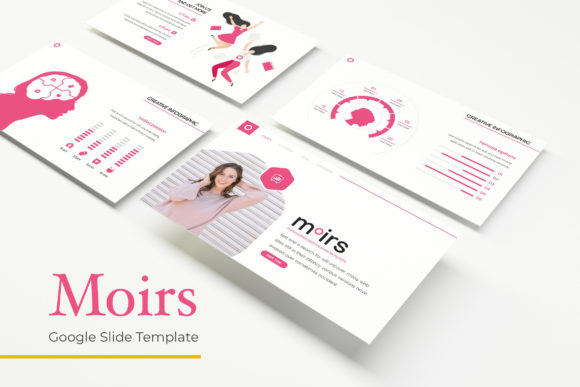
At its core, the Moirs template is a comprehensive design system for Google Slides. It moves far beyond a single static layout. With over 150 total slides, it provides a vast library of pre-designed components—infographics, portfolio grids, section breaks, and content layouts—organized into five distinct, premade color schemes. Each color scheme is a complete visual identity, offering 30 carefully crafted slides that share a consistent aesthetic. This structure means you’re not just getting a slide deck; you’re getting a flexible toolkit for building any kind of visual narrative, from a sleek corporate report to a vibrant creative portfolio.
A Toolkit for Real-World Projects
The true value of a template like this is measured in its practical application. For a small business owner pitching to investors, the clean, professional layouts convey credibility and attention to detail. A marketing team can use the handcrafted infographics to break down complex data into easily digestible visuals for a client presentation. The gallery and portfolio slides are a game-changer for designers, photographers, or architects who need to showcase their work in a structured, visually appealing way without spending hours aligning images and text boxes.
Beyond formal presentations, the assets have surprising versatility. The resizable and editable graphic elements, built on master slides, allow for significant customization. You could repurpose a beautifully designed section break as a header for a blog post, use an infographic layout as a blueprint for a social media carousel, or adapt a portfolio slide into a stunning page for a digital lookbook. The pixel-perfect illustrations ensure that every element you use maintains a high standard of visual quality, whether it’s viewed on a large screen or a mobile device.
Building Consistency and Professionalism
One of the most significant challenges in branding and marketing is maintaining visual consistency across all touchpoints. A disjointed visual identity can confuse your audience and weaken brand recognition. This is where the Moirs Google Slide Template excels as a foundational design asset. By using the five premade color palettes and the system of master slides, you can ensure that every presentation, proposal, or internal document aligns with your brand’s visual language. The cohesive look and feel across all 150+ slides create a seamless experience, reinforcing your brand’s professionalism with every click.
This consistency directly impacts how your audience perceives and engages with your content. A polished, well-designed presentation is easier to follow. Clear visual hierarchies guide the viewer’s eye, and purposeful use of color and typography enhances readability. When the design supports the message rather than distracting from it, your key points land with greater impact. This template provides the structure to achieve that clarity, allowing you to focus on crafting your message rather than wrestling with formatting.
Practical Advice for Using Design Templates
Integrating a new template into your workflow is a smooth process, especially with the included resources. The "Readme First" file is your starting point, guiding you through the setup. A critical step is installing the recommended font, for which a free download link is provided. Using the specified typeface ensures the layouts appear as intended, preserving the careful balance between text and imagery designed by the template’s creator. This attention to typographic detail is what separates a premium, professional asset from a basic download.
When you begin customizing, think of the template as a flexible framework. Start by selecting the color scheme that best matches your project’s mood or your brand’s palette. Then, explore the slide library. Don’t feel constrained to use slides in their original sequence. Mix and match a data-heavy infographic slide with a minimalist quote slide to create dynamic pacing in your narrative. The drag-and-drop picture placeholder feature is particularly useful here, allowing you to quickly insert your own visuals without manual cropping and resizing. Always preview your slides in presentation mode to check for flow and readability before sharing.
Finally, consider the broader ecosystem of your design projects. The elements within the Moirs template—the clean lines, the modern layouts, the structured infographics—can inspire and inform other areas of your work. The style of a diagram might influence how you design a website wireframe. A particular color combination could be adopted for your social media graphics. By thinking of the template not as a one-off tool but as a source of reusable design components, you maximize its utility and ensure a harmonious visual presence across all your creative outputs, from digital presentations to printed materials.