Transform Your Presentations: Unlocking the Power of Probo
We’ve all been there—staring at a blank slide deck, trying to force a generic corporate template to match the vibrant energy of a new brand or the sleek sophistication of a marketing pitch. The struggle to create a visually cohesive and professional presentation often eats up time that could be spent on strategy and storytelling. This is where the Probo Keynote Template steps in, not just as a set of slides, but as a comprehensive design system built for professionals who value both aesthetics and efficiency. With over 150 total slides and five distinct color variations, this resource is designed to eliminate the friction of presentation design, allowing you to focus entirely on your message.
A Visual System for the Modern Brand
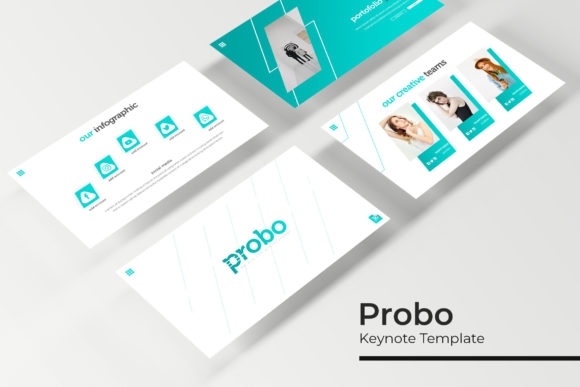
What sets this template apart is its commitment to visual consistency. For small business owners and marketers, maintaining a consistent brand identity across all touchpoints is non-negotiable. The Probo template offers five premade color schemes, each containing 30 meticulously crafted slides. This structure ensures that whether you are pitching to investors, presenting a quarterly report, or launching a new product, your visual language remains uniform. The color palettes are modern and versatile, ranging from vibrant hues suitable for creative agencies to muted tones perfect for corporate environments. This variety allows you to match the template to your existing brand identity without extensive color grading or adjustments.
The design philosophy here leans heavily on modern typography and clean layouts. The slides utilize a balanced mix of serif and sans-serif fonts, ensuring high readability while maintaining a distinct personality. The typography is not just decorative; it serves a functional purpose, guiding the viewer’s eye through the content hierarchy naturally. This is particularly useful for editorial design presentations or marketing assets where text-heavy slides need to remain engaging and digestible.
Practicality Meets Pixel-Perfect Design
One of the most common frustrations with premium templates is the rigidity of their graphics. Probo addresses this by featuring resizable and editable graphic picture placeholders and pixel-perfect illustrations. The inclusion of handcrafted infographics is a standout feature. Data visualization is often the weak point of many presentations, but with these custom infographics, complex data can be presented in a way that is both beautiful and easy to understand. Whether you are mapping out a customer journey, displaying financial statistics, or outlining a project timeline, these graphics provide a professional polish that standard charts cannot match.
For those who need to showcase work, the Gallery and Portfolio slide layouts are invaluable. Creatives, from photographers to crafters, often need to let their work speak for itself. These slides are designed with generous white space and structured grids that frame your imagery perfectly. The drag & drop functionality, based on Master Slides, means you can update these portfolios in seconds. You don’t need to be a PowerPoint or Keynote wizard to make these templates work for you; the architecture is intuitive, allowing you to focus on content rather than formatting.
Beyond the Boardroom: Versatile Applications
While "presentation" often implies a boardroom setting, the versatility of the Probo Keynote Template extends far beyond standard pitches. Consider the needs of a content creator or a blogger. These slides can be exported and repurposed as high-quality social media graphics. A single, well-designed statistics slide can become a powerful Instagram carousel, driving audience engagement. A "Meet the Team" slide can be adapted for a website "About Us" page, ensuring visual consistency between your pitch deck and your online presence.
Furthermore, the structure is ideal for creating digital products. If you are an entrepreneur selling courses or workshops, you can use these slides as a foundation for your course materials. The professional design adds perceived value to your product, helping with brand recognition. For packaging design presentations, the clean layouts allow you to mock up box designs and label placements without the background noise of a cluttered slide.
What’s Included and How to Get Started
Efficiency is key in the professional world, and this package is built with that in mind. The download includes five PPTX files for both standard and widescreen formats, covering all the color variations mentioned. To ensure you can hit the ground running, the package includes a "Readme First" file and links to the free font downloads used in the designs. This attention to detail ensures that the typography renders correctly on your system, preserving the intended look of the typeface pairings.
When you first open the files, take a moment to review the Master Slides. This is where the magic happens. By understanding the master layout, you can make global changes to fonts or colors if the premade options don’t perfectly suit your specific logo design or corporate palette. This flexibility is a hallmark of a truly professional design asset. It’s not just a static image; it’s a malleable tool.
Choosing the Right Visual Strategy
When integrating a template like this into your workflow, it’s helpful to think about your specific goals. Are you trying to educate? The infographic-heavy layouts are your best bet. Are you trying to inspire? Utilize the full-bleed image slides to create an emotional connection. The section break slides are particularly useful for pacing your narrative, allowing you to pause and reset the audience's attention before diving into a new topic.
For those concerned with commercial licensing, it is always best practice to review the terms included in the readme file, especially if you plan to use the final output in merchandise or broad distribution. However, for internal business use, client pitches, and digital content creation, the template provides a robust framework that saves hundreds of design hours.
Ultimately, the goal of any design tool is to reduce the barrier between your idea and its execution. The Probo template achieves this by offering a balance of structure and creative freedom. It provides the scaffolding of a professional presentation while leaving the storytelling to you. Whether you are a designer looking to speed up your workflow or a small business owner needing to look polished and credible, this resource offers a tangible way to elevate your visual communication.