Transform Your Pitch: The Sepatu PowerPoint Template Unveiled
Picture this: you have a groundbreaking idea, a compelling business model, or a creative portfolio that deserves the spotlight. You sit down to build the presentation, but within minutes, you are staring at a blank slide, wrestling with alignment issues and uninspiring default layouts. The gap between a great idea and a great presentation often lies in the visual tools we use to bridge it. For entrepreneurs, marketers, and designers, the stress of creating pixel-perfect slides from scratch steals time better spent on strategy and content. This is where a robust design asset like the Sepatu PowerPoint Template steps in, offering a comprehensive solution that combines aesthetic flexibility with structural efficiency.
A Visual Playground: The 150+ Slide Ecosystem
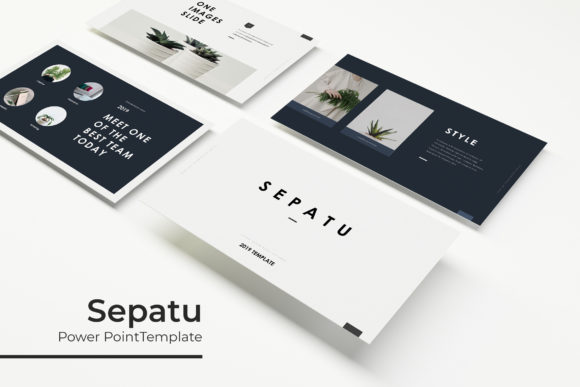
The true power of the Sepatu PowerPoint Template lies in its sheer volume and versatility. With over 150 total slides included, this package is not just a few decorative pages; it is a complete visual communication system. The structure is built around five premade color themes, each containing 30 meticulously designed slides. This approach allows you to switch the entire mood of your presentation with a single click, ensuring that whether you are pitching to a corporate board or a creative startup, the tone is immediately appropriate.
Visual consistency is the backbone of brand recognition, and this template excels in that department. The handcrafted infographics are particularly useful for professionals who need to present complex data without losing their audience. Instead of generic chart styles, these infographics are designed to be visually engaging, turning dry statistics into a story. Furthermore, the inclusion of section break slides helps structure the narrative flow, giving your audience a mental pause while reinforcing the visual hierarchy of your brand identity.
Practicality Meets Design: Who Needs This Template?
While the aesthetic appeal is obvious, the practical utility of the Sepatu PowerPoint Template spans across various professional disciplines. For small business owners, this is a tool for survival. When you are managing operations, marketing, and sales, you cannot afford to spend hours on design theory. This template allows you to drag and drop your content into master slides, ensuring that every presentation looks polished and professional without requiring a degree in graphic design.
Content creators and bloggers will find the gallery and portfolio slides indispensable. If you are pitching a collaboration to a brand partner or showcasing your recent work, the layout is designed to highlight visuals. The picture placeholders are fully resizable and editable, meaning you can adapt the grid to fit your specific imagery, whether it is a high-resolution product shot or a lifestyle photo. This flexibility is crucial for maintaining a cohesive brand identity across different platforms, from a live stage presentation to a digital PDF download.
Beyond the Boardroom: Marketing and Branding Applications
The utility of a high-quality presentation design extends far beyond the conference room. Marketing professionals can repurpose these slides for social media graphics. A single, well-designed data slide can be cropped and exported as an Instagram post or a LinkedIn graphic, ensuring that your visual language remains consistent across all channels. Similarly, the template’s clean lines and modern typography make it suitable for digital products. If you are creating a lead magnet or an ebook, the underlying structure of the Sepatu PowerPoint Template can serve as a robust foundation for your layout.
For those involved in packaging design or editorial layouts, the slides offer a unique way to mock up concepts. The pixel-perfect illustrations provide a professional backdrop for presenting mood boards or product lines. Imagine using the widescreen format to display a new packaging concept to a client; the high-definition clarity ensures that every detail of your design is visible and appreciated. It transforms the presentation from a simple slideshow into a visual experience.
Master Slides and Workflow Efficiency
One of the most technical yet valuable features of this package is its reliance on Master Slides. For anyone who has ever tried to edit a complex PowerPoint file only to find that changing one element breaks the layout of the entire deck, this feature is a lifesaver. By basing the design on Master Slides, the Sepatu PowerPoint Template ensures that elements stay locked in place, fonts remain consistent, and the layout holds its integrity even when you are rushing to finalize a presentation minutes before a meeting.
The "Readme First" file included in the package is a testament to the user-centric design approach. It guides you through the setup process, ensuring that you can install the free fonts used in the design immediately. This attention to detail removes the frustration of missing font errors, which is a common headache when working with premium design assets. The inclusion of 5 PPTX files in widescreen format ensures that the template is ready for modern displays, providing a cinematic viewing experience that holds attention.
Typography and Visual Hierarchy
Typography is not just about choosing a pretty font; it is about communication. The Sepatu PowerPoint Template utilizes a carefully curated set of typefaces that balance readability with personality. The headers are designed to command attention, while the body text is optimized for legibility, even from the back of a large room. This is a critical consideration for anyone delivering a keynote or a workshop.
However, the template is also a canvas for customization. If you have a specific brand font, the editable nature of the slides allows you to swap out the default typography for your own. This ensures that the template acts as a vessel for your brand identity, not a replacement for it. The ability to match typography to project goals—whether you need a serif font for a traditional feel or a sans-serif for a modern edge—makes this a versatile tool for any creative entrepreneur.
Maximizing the Asset: Tips for Implementation
To get the most out of the Sepatu PowerPoint Template, consider the workflow that best suits your needs. Start by selecting the color theme that aligns closest to your current project or brand palette. From there, utilize the section break slides to outline your narrative arc before filling in the content. This top-down approach helps you focus on the message first, letting the design support the story rather than dictate it.
For those using the template for portfolio purposes, leverage the gallery slides to create a rhythm of images. Avoid overcrowding the slides; the white space provided in the design is intentional and helps the viewer’s eye focus on the key elements. When using the handcrafted infographics, ensure your data is accurate and simplified. The design can make data look good, but it cannot fix confusing logic. Finally, remember that the photographs used in the preview are for illustration, so investing in high-quality stock photography or your own original images will elevate the final result from "template" to "custom design."
In a digital landscape where visual noise is constant, clarity is your competitive advantage. The Sepatu PowerPoint Template offers a structured, beautiful, and efficient way to present your ideas, ensuring that your content is not just seen, but remembered. Whether you are closing a sale, teaching a class, or sharing a vision, having a reliable visual framework allows you to communicate with confidence and style.