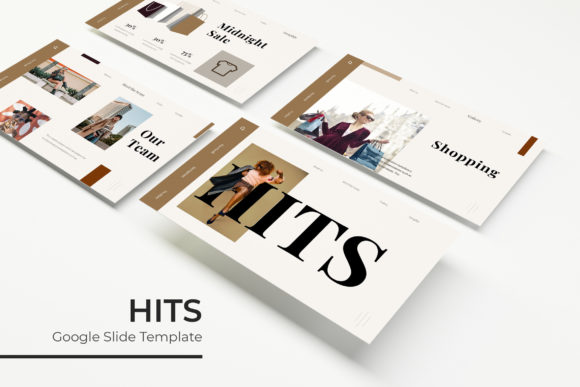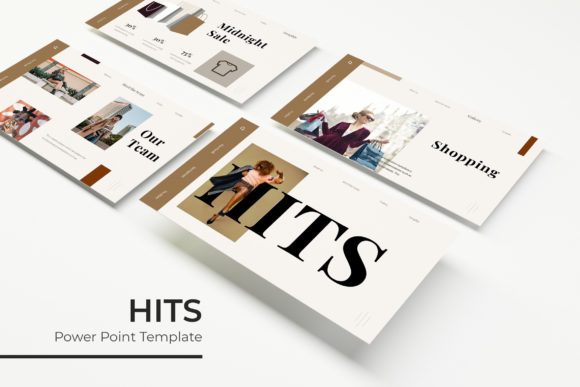
Transform Your Next Pitch with the Hits Keynote Template
Imagine this: you have ten minutes to convince a skeptical investor, a crowded conference hall, or a potential high-ticket client that your vision is worth their time and money. You open your laptop, the projector flickers to life, and the first slide appears. If that slide is a generic white background with bullet points in Calibri, you have already lost half your audience before you speak a word. In the world of business and design, visuals aren't just decoration; they are a fundamental part of your communication strategy. This is where having a robust library of design assets becomes a game-changer, specifically the kind of comprehensive toolkit found in the Hits Keynote Template.
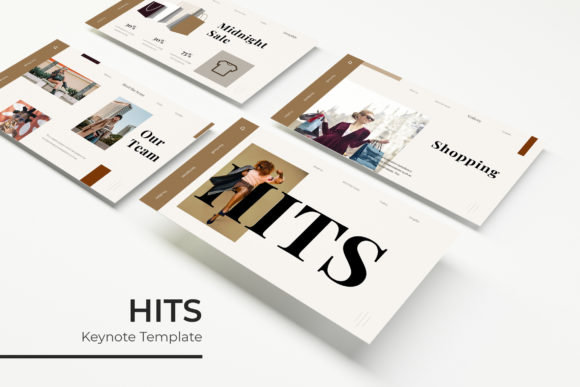
For entrepreneurs, marketers, and creatives, the struggle is often finding the balance between speed and quality. You need a presentation that looks like it was crafted by a high-end agency, but you don't have three weeks to build it from scratch. The solution isn't just a "pretty background"; it is a structured system of visual communication. The Hits Keynote Template offers exactly that: a massive collection of 150+ total slides built on a foundation of modern typography and pixel-perfect illustration. But beyond the sheer volume of slides, the real value lies in how these assets can streamline your workflow and elevate your brand identity.
Why Visual Consistency is Your Secret Weapon
When we talk about branding, we often focus on the logo or the color palette. However, typography is the silent ambassador of your brand. If your website uses a sleek serif font, your packaging uses a playful script font, and your investor deck uses a standard system font, you are creating visual noise. You are telling your audience that you haven't paid attention to the details. The Hits Keynote Template solves this by providing five premade color variations, allowing you to instantly match your presentation to your existing brand identity.
Think about the psychology of color and shape. A tech startup might gravitate toward the blue or grey variations for a sense of trust and stability, while a lifestyle brand might opt for the warmer or more vibrant color schemes included in the package. By using the Master Slides feature, you ensure that every single page of your deck maintains that visual rhythm. This isn't just about looking good; it is about readability. When your audience doesn't have to struggle to read the text or decipher the layout, they can focus entirely on your message. That is the power of modern typography applied correctly.
Beyond the Boardroom: Versatile Applications for Modern Creatives
It is a mistake to think of a Keynote file solely as a tool for corporate meetings. The architecture of the Hits Keynote Template—featuring handcrafted infographics, gallery slides, and portfolio layouts—makes it a versatile design asset for a variety of projects. If you are a freelance designer or a photographer, the dedicated portfolio sections allow you to showcase your work without fighting with formatting. The picture placeholders are designed for drag-and-drop functionality, meaning you can swap out images in seconds while maintaining the pixel-perfect composition of the original design.
Consider the needs of a small business owner creating a lookbook or a media kit. Instead of hiring a graphic designer for every seasonal update, you can utilize the 30 slides per template structure to lay out product features, team bios, and testimonials. The infographics included are not just decorative; they are data visualization tools. Whether you are breaking down market share, illustrating a workflow process, or displaying pricing tiers, these handcrafted graphics help you tell a data-driven story that is easy to digest. This is invaluable for marketing assets, internal training documents, or even editorial layouts for digital magazines.
Optimizing Your Workflow with Editable Graphics
One of the most frustrating aspects of using templates is "breaking" the design. You move one text box, and suddenly the alignment on the whole page is off. This is why the technical build of the Hits Keynote Template matters. Because it is based on Master Slides, the structure is rigid where it needs to be (keeping things aligned) but flexible where you want it to be (changing content). This is particularly useful for teams. If you are collaborating on a pitch deck, the Master Slide system ensures that no matter who edits the file, the output remains professional.
Furthermore, the inclusion of resizable and editable graphics means you are not locked into a specific dimension. If you need to repurpose a specific chart for a social media post or a blog header, you can extract the element, resize it without losing quality, and export it. This turns your presentation software into a lightweight graphic design tool. For those who aren't experts in Adobe Illustrator or Photoshop, this is a massive advantage. It empowers you to create social media graphics and web assets that match your presentation perfectly, ensuring a cohesive look across all platforms.
Choosing the Right Structure for Your Story
With 150+ slides at your disposal, the challenge shifts from "how do I design this?" to "how do I curate this?" A great presentation is like a great story; it needs a beginning, a middle, and an end. The section break slides included in the package are crucial here. They act as visual pauses, signaling to your audience that you are moving to a new topic. This prevents cognitive overload and keeps your viewers engaged.
When assembling your deck, think about the flow of information. Start with a strong hook using the gallery or full-image slides to set the mood. Move into the "problem/solution" phase using the text-heavy layouts, but break up the density with the handcrafted infographics. Use the portfolio slides to provide social proof or case studies. Finally, end with a clear call to action. By leveraging the variety of layouts—ranging from minimal text to complex data visualization—you can keep the energy high throughout the presentation. This variety is what separates an amateur slideshow from a professional presentation.
Practical Considerations for Implementation
Before you dive in, there are a few practical steps to ensure you get the most out of this asset. First, pay attention to the font used. The designers have curated a specific typeface to match the aesthetic of the slides. The package includes a free font download link, which is a significant benefit. Before presenting, ensure the font is installed on the computer you will be using to avoid formatting errors. If you decide to swap the font for your brand’s specific typeface, test the font pairings carefully. A clean sans serif font usually pairs well with the modern, clean lines of these templates.
Also, remember that while the templates provide the structure, the content is up to you. The picture placeholders are there to guide you, but you should aim to use high-resolution imagery. Blurry photos will undermine even the best layout. Since the package includes PPTX files for both standard and widescreen formats, choose the one that best fits your presentation environment. Widescreen is generally the modern standard for projectors and monitors, offering a more cinematic feel that utilizes the pixel-perfect illustrations to their fullest extent.
Final Thoughts on Visual Communication
In a crowded market, the tools you use reflect the standards you set for your work. Whether you are a hobbyist presenting a creative project or a marketing professional pitching a campaign, the quality of your visual aids speaks volumes. The Hits Keynote Template is more than just a collection of slides; it is a framework for clear, compelling communication. By combining modern typography, structured data visualization, and a flexible color system, it allows you to focus on what matters most: your message. Take the time to explore the different color variations and slide types, and you will find that building a powerful narrative becomes not only easier but genuinely enjoyable.