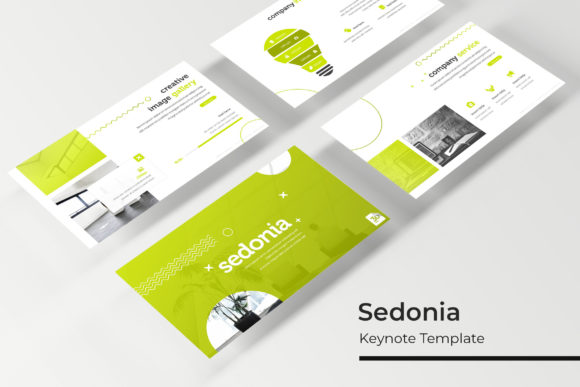
Sedonia Keynote Template: Crafting Visual Narratives
Every presentation tells a story, but not all stories are told with equal impact. Whether you're pitching a new business idea, showcasing a portfolio, or leading a workshop, the visual framework you choose sets the entire tone. The Sedonia Keynote Template arrives as more than just a set of slides; it’s a comprehensive visual system designed to transform complex information into a clear, compelling narrative. With its vast library of over 150 handcrafted slides, this template provides a professional foundation that adapts to your message, ensuring your content is not just seen, but remembered.
At its core, Sedonia is built for versatility and visual consistency. The package includes five distinct, premade color schemes, each containing 30 meticulously designed slides. This structure is a game-changer for maintaining brand integrity. Imagine developing a presentation for a client with a specific brand palette—Sedonia allows you to select the color variation that aligns perfectly, or use it as a starting point for customization. The pixel-perfect illustrations and handcrafted infographics are not generic clip art; they are sophisticated design assets that elevate data visualization, making charts, timelines, and process flows engaging and easy to digest. The inclusion of section break slides and dedicated gallery/portfolio slides further demonstrates an understanding of professional presentation needs, helping to segment your talk logically and showcase visual work beautifully.
A Practical Toolkit for Modern Creators
For the entrepreneur, marketer, or content creator, time is a precious commodity. Sedonia addresses this by prioritizing efficiency without sacrificing quality. The drag-and-drop picture placeholder functionality is a subtle but powerful feature. Instead of wrestling with alignment and sizing, you can simply drag your images into pre-formatted boxes, and they snap perfectly into place. This is based on master slides, a foundational design principle that ensures global changes—like updating a font or color accent—can be made in one place and reflected across the entire presentation. This level of control is essential for creating polished, professional marketing assets or internal training materials where consistency is key.
Think beyond the traditional boardroom. The clean, modern typography and structured layouts make this template ideal for a variety of creative applications. A blogger could use the gallery slides to create a stunning visual lookbook for a new product line. A graphic designer might repurpose the infographic slides to create an engaging one-page report for a social media campaign. The widescreen format is optimized for today’s digital displays, making it perfect for webinars, online courses, and video content. The fact that all graphics are resizable and editable means the template is a starting point, not a constraint—you can scale elements to fit a square social media graphic or adapt a slide into a poster for a local event.
Building Cohesion from Pitch to Publication
Visual consistency is the silent engine of brand recognition. When your pitch deck, your Instagram story, and your website banner all share a common design language, you build trust and professionalism. Sedonia’s five premade color palettes provide an immediate framework for this. A small business owner launching a new product could use one color scheme for investor presentations, another for customer-facing social media teasers, and a third for internal team briefings, all while maintaining a cohesive family feel. The included section break slides act as visual punctuation, guiding your audience through the narrative arc of your talk and preventing the monotony of a slide-after-slide format.
The practical value extends to the assets included. Having five PPTX files for each color variation means you’re not starting from scratch each time. The "Readme First" file and included font download link are thoughtful touches that respect the user’s time, ensuring you can get started immediately without hunting for resources. This consideration mirrors the experience of working with a premium font package, where every element is designed to work in harmony. The template’s style leans towards a clean, modern aesthetic that pairs well with both serif and sans serif fonts, giving you flexibility in finalizing your brand’s typographic voice.
Making the Template Your Own
Choosing a presentation template is much like choosing a typeface for a logo—it needs to reflect the personality of the project. Sedonia’s design is contemporary and versatile, but its true power is unlocked through customization. Start by selecting the color scheme that best resonates with your project’s mood. Are you presenting innovative tech? The cooler palette might work. Pitching a creative agency? Perhaps a bolder variation. Next, leverage the master slides to input your brand’s specific fonts. This is where you can blend a strong display font for headlines with a highly readable sans serif for body text, creating a hierarchy that guides the viewer’s eye.
Test your content on the slides. The drag-and-drop placeholders make it easy to swap out images, but always consider readability. Ensure your text has sufficient contrast against any background images or colored sections. Use the infographic slides to break down your most complex points—audiences engage more with visual data than with dense paragraphs of text. The portfolio slides are your canvas; use them not just to show final products, but to tell the story behind the work, perhaps using one slide for a project overview and the next for close-up details. This approach transforms a simple slideshow into an immersive editorial layout.
Finally, remember that a template is a tool, and the best tools adapt to your workflow. Whether you are a designer creating a client deliverable, a marketer building a campaign toolkit, or a hobbyist organizing a community workshop, Sedonia provides a professional-grade starting point. Its value lies in the hours of design labor it saves and the polished, consistent result it guarantees. By focusing on your content and using the template’s structure to enhance your message, you create presentations that are not only visually appealing but strategically effective, turning every slide into an opportunity to connect and communicate with clarity.