Craft Your Next Pitch: The Start Up Power Point Template
You’ve poured your heart and soul into your business idea. You’ve mapped out your strategy, refined your product, and you’re ready to share your vision with the world—whether that’s with potential investors, a new client, or your own team. But when you open a blank presentation file, the excitement can quickly turn to dread. How do you translate all that passion and complex information into a visual story that’s clear, compelling, and professional? This is where the right design tool becomes less of a luxury and more of a strategic asset. A well-structured presentation template doesn’t just make slides look pretty; it provides a framework for your ideas, ensuring your message lands with impact.
Beyond a Single Color Scheme: A System for Visual Storytelling
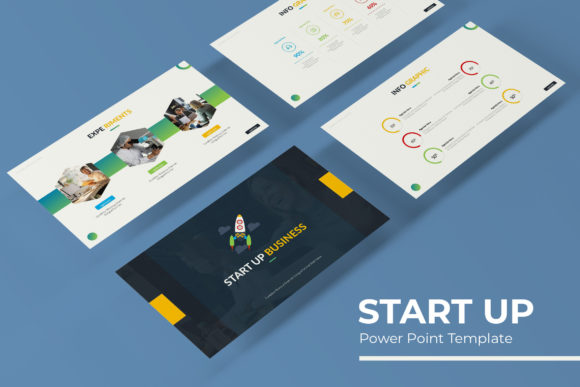
The challenge with many templates is their one-size-fits-all approach. Your brand has a unique personality, and a generic blue or gray theme might not resonate. The Start Up Power Point Template addresses this directly by offering a system, not just a single file. With 150+ Total Slides built on 5 Premade colors, you get 30 Slides for each Template color variation. This means you can choose a palette that genuinely aligns with your brand identity—be it vibrant and energetic, sleek and minimalist, or warm and approachable—right from the start. It’s about creating a cohesive visual language that supports your narrative, whether you're explaining a complex business model, showcasing a product roadmap, or presenting quarterly results.
The true power lies in the thoughtful structure. Section Break Slides allow you to create clear chapters in your presentation, guiding your audience smoothly from one idea to the next. The Gallery and Portfolio slide layouts are perfect for visually-driven businesses—think designers, photographers, or consultants—where showing is far more telling than saying. Instead of struggling to arrange images, you have dedicated, beautifully spaced frames ready to go. The inclusion of Handcrafted Infographic elements is a game-changer for making data digestible. Rather than presenting a table of numbers, you can transform statistics into engaging visual stories using custom charts, timelines, and process diagrams that feel integrated into your overall design.
Practicality Meets Professional Polish
A beautiful design is useless if it’s not functional. This is where practical features come into play. Every element is Resizable and Editable, and the Graphic Picture Placeholder functionality is a massive time-saver. Need to swap out a team photo? Simply drag and drop your new image into the designated area, and it automatically scales and crops to fit perfectly. This drag & drop ease is built on a solid foundation: Master Slides. Editing a master slide changes the design across all associated slides, allowing you to update your brand color, adjust a font, or add a logo globally in seconds. This ensures Pixel-perfect illustrations and consistent formatting throughout your entire deck, eliminating those small, frustrating inconsistencies that can make a presentation look amateur.
For the entrepreneur or creator who wears many hats, this efficiency is invaluable. You’re not spending hours aligning boxes or resizing text. You’re focusing on your message. The template acts as a silent collaborator, handling the heavy lifting of design so you can concentrate on content. It’s also built for the modern workflow. The files are optimized for widescreen displays, which is standard for today’s laptops and projectors, ensuring your presentation looks sharp and professional in any meeting room or webinar setting.
From Pitch Deck to Brand Asset Library
Think of this template as the cornerstone of a larger brand identity toolkit. The visual style you establish in your investor pitch can be carried through to your social media graphics, internal training materials, and client proposals. The modern typography and clean layout principles provide a foundation for visual consistency across all your communications. This consistency is what builds brand recognition—when people see your distinct color palette and design style, they immediately connect it with your business.
The applications extend far beyond the boardroom. Use the infographic slides to create engaging educational content for your blog or online course. Adapt the portfolio layouts to showcase your work on your website. Pull individual slide designs to quickly generate social media graphics that maintain a unified look. The template becomes a versatile library of design assets you can repurpose, saving you from starting from scratch every time you need a new piece of visual content. It’s a practical approach to maintaining a professional standard across all your marketing assets, from a high-stakes presentation to an Instagram story.
Getting Started and Making It Your Own
Upon purchase, you’ll find the package straightforward: 5 KEY Files (Keynote format) and 5 KEY Widescreen versions, each corresponding to one of the 5 premade color schemes. A helpful Readme First document is included, which is always worth a quick scan. You’ll also get a link for the Font used (free font download link included), so you can maintain the exact typographic style designed into the template. This is a crucial detail for professional presentation; mismatched fonts can instantly break the visual harmony.
When you open the file, take a moment to explore the slide master view. This is your control center. Here, you can set your brand’s primary and secondary colors, choose your preferred font pairing, and add your logo to the footer. Once these are set, every new slide you create will automatically adopt these settings. Start by selecting the color variation that best fits your current project. Then, build your outline using the section break slides to map your story flow. From there, populate the content slides with your text and images, utilizing the placeholders for seamless integration.
Remember, the goal isn’t to use every single slide. It’s a library of options. Curate the slides that best serve your specific message. The handcrafted infographics are there to simplify complexity, not to be used as decoration. Test how your content reads on different slides—sometimes a timeline works better than a bullet list, or a single powerful image speaks louder than a grid. This template gives you the professional tools and the creative freedom to craft a presentation that doesn’t just share information but creates an experience for your audience, helping you communicate with the clarity and confidence your ideas deserve.